
This file is a merged representation of a subset of the codebase, containing specifically included files and files not matching ignore patterns, combined into a single document by Repomix.
This file contains a packed representation of a subset of the repository’s contents that is considered the most important context. It is designed to be easily consumable by AI systems for analysis, code review, or other automated processes.
The content is organized as follows:
- This summary section
- Repository information
- Directory structure
- Repository files (if enabled)
- Multiple file entries, each consisting of: a. A header with the file path (## File: path/to/file) b. The full contents of the file in a code block
- This file should be treated as read-only. Any changes should be made to the original repository files, not this packed version.
- When processing this file, use the file path to distinguish between different files in the repository.
- Be aware that this file may contain sensitive information. Handle it with the same level of security as you would the original repository.
- Some files may have been excluded based on .gitignore rules and Repomix’s configuration
- Binary files are not included in this packed representation. Please refer to the Repository Structure section for a complete list of file paths, including binary files
- Only files matching these patterns are included: docs//*.md, example/
- Files matching these patterns are excluded: docs/extending/ai-prompts.md, docs/for-ai.md, docs/index.md, docs/quickstart.md
- Files matching patterns in .gitignore are excluded
- Files matching default ignore patterns are excluded
- Files are sorted by Git change count (files with more changes are at the bottom)
docs/
  concepts/
    block-bindings.md
    helper-blocks.md
    index.md
    inline-bindings.md
  extending/
    block-patterns.md
    block-registration.md
    data-source.md
    hooks.md
    index.md
    overrides.md
    query-input-schema.md
    query-output-schema.md
    query.md
  tutorials/
    airtable.md
    google-sheets.md
    http.md
    index.md
    shopify.md
  local-development.md
  troubleshooting.md
example/
  .cursor/
    rules/
      project-scope.mdc
  assets/
    blueprint-content.wxr
  blocks/
    art-block/
      art-block.php
    book-block/
      patterns/
        book-pattern.html
      book-block.php
    github-markdown-block/
      inc/
        patterns/
          file-render.html
        github-query-runner.php
        markdown-links.php
      github-markdown-block.php
    shopify-mock-store-block/
      shopify-mock-store-block.php
    weather-block/
      patterns/
        weather-block-pattern.html
      weather-block.php
    zip-code-block/
      zip-code-block.php
  templates/
    airtable-block/
      airtable-block.php
    airtable-map-block/
      src/
        leaflet-map/
          block.json
          edit.js
          index.js
          render.php
          view.js
      .gitignore
      airtable-map-block.php
      package.json
      README.md
    google-sheets-block/
      google-sheets-block.php
    rest-api-block/
      rest-api-block.php
    rest-api-block-from-ui-data-source/
      rest-api-block-from-ui-data-source.php
    shopify-product-block/
      shopify-product-block.php
    theme/
      functions.php
      README.md
      screenshot.png
      style-remote-data-blocks.css
      style.css
      theme.json
  README.md
# Block bindings

Remote Data Blocks takes advantage of the [block bindings API](https://developer.wordpress.org/block-editor/reference-guides/block-api/block-bindings/). This core WordPress API allows you to “bind” dynamic data to the attributes of core blocks, which are then reflected in the final HTML markup. Generally, this avoids the need to write and maintain custom blocks.

For a quick overview of block bindings, the [announcement post](https://make.wordpress.org/core/2024/03/06/new-feature-the-block-bindings-api/) is very helpful; for a deeper dive, consult the [public documentation](https://developer.wordpress.org/block-editor/reference-guides/block-api/block-bindings/). That said, an in-depth understanding of block bindings isn't necessary to use Remote Data Blocks: just know that the plugin is built on core, stable WordPress APIs.# Helper Blocks
Remote Data Blocks adds some accessory blocks for bindings, listed below.
## Remote HTML Block
Use this block to bind to HTML from a remote data source. This block only works when placed inside a remote data block container and bound to a field containing HTML.
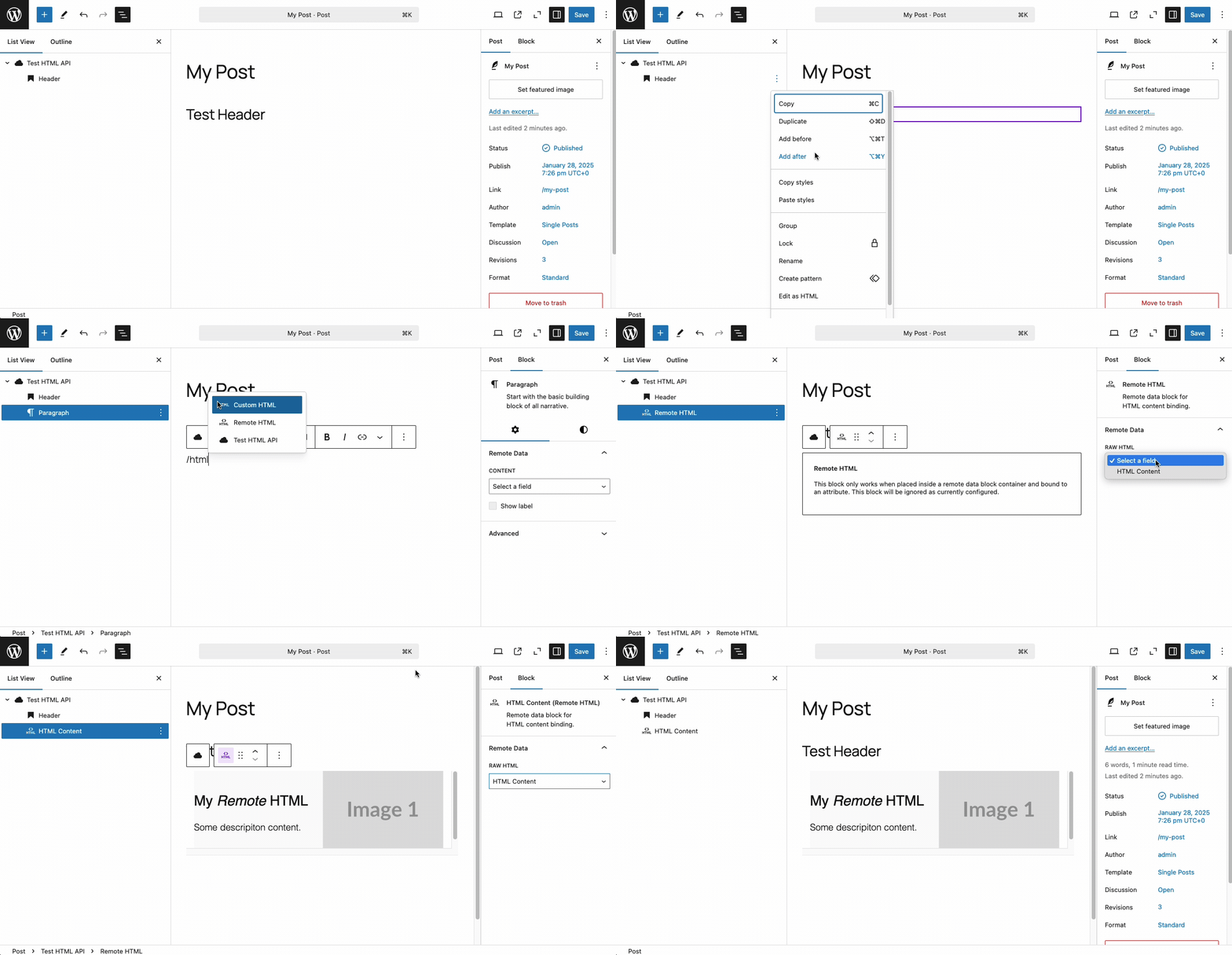
Fields defined by a query’s `output_schema` must have type `html` in order to be available to Remote HTML blocks:
```php
$my_query = [
/* ... */
'output_schema' =>
'is_collection' => false,
'output_schema' => [
'type' => [
'header' => [
'name' => 'Header',
'path' => '$.header',
'type' => 'string',
],
'myHtmlContent' => [
'name' => 'My HTML Content',
'path' => '$.myHtmlContent',
'type' => 'html', // <-- required
],
],
],
];
register_remote_data_block( [
'title' => 'My HTML API',
'render_query' => [
'query' => $my_query,
],
] );
```
## No Results Block
This block is used to display a message or content when a remote data block query returns no results. It is automatically inserted whenever you use a query that resolves to a collection, even if the collection is not currently empty.# Inline bindings
One of the current limitations of the [block bindings API](block-bindings.md) is that it is restricted to a small number of core blocks and attributes. For example, currently, you cannot bind to the content of a table block or a custom block. You also cannot bind to a _subset_ of a block's content.
As a partial workaround, this plugin provides a way to use remote data in some places where block bindings are not supported. This feature is named "inline bindings" and it is available in any block that uses [rich text](https://developer.wordpress.org/block-editor/reference-guides/richtext/), such as tables, lists, and some custom blocks. Look for the inline binding button in the rich text formatting toolbar:
<img width="535" alt="Inline binding button" src="https://github.com/user-attachments/assets/8ce0bd18-367e-46d5-a870-22819c42ff4a" />
Clicking this button will open a modal that allows you to select a field from a remote data source, resulting in an inline remote data binding. Just like remote data blocks, this binding will resolve from the remote source when the content is rendered.
<img width="684" alt="A bulleted list using several inline bindings to describe three conference events" src="https://github.com/user-attachments/assets/6527dcc0-c0ed-42ab-9655-b8fc2510e15b" />
Inline bindings compile to HTML, so they are portable, safe, and have a built-in fallback.# Block patterns
Patterns allow you to represent your remote data in different ways.
The plugin registers an unstyled block pattern any time you register a remote data block either in the WordPress admin or with `register_remote_data_block`.
You can create additional patterns in the WordPress Site Editor or programmatically by passing a `patterns` property to your block options.
You cannot edit the default pattern, but you can duplicate it and make changes.
We recommend duplicating the default pattern and then making changes in the Site Editor. Once you've created your preferred pattern, you can associate it with the block in the `register_remote_data_block` call.
If you want to make the pattern uneditable in the Site Editor, you can copy the block markup to a file and commit it to your repository.
## Example
```html
<!-- wp:group {"layout":{"type":"constrained"}} -->
<div class="wp-block-group">
<!-- wp:heading {"metadata":{"bindings":{"content":{"source":"remote-data/binding","args":{"field":"title"}}}}} -->
<h2 class="wp-block-heading"></h2>
<!-- /wp:heading -->
<!-- wp:paragraph {"metadata":{"bindings":{"content":{"source":"remote-data/binding","args":{"field":"description"}}}}} -->
<p></p>
<!-- /wp:paragraph -->
</div>
<!-- /wp:group -->
```
You could save this file as `my-pattern.html` in the same directory as the code that registers your block.
```php
register_remote_data_block( [
'title' => 'My Remote Data Block',
'render_query' => [ /* ... */ ],
'patterns' => [
[
'title' => 'My Pattern',
'html' => file_get_contents( __DIR__ . '/my-pattern.html' ),
],
],
] );
```# Block registration
Use the `register_remote_data_block` function to register your remote data block and associate it with your query and data source. This example:
1. Creates a [data source](data-source.md).
2. Associates the data source with a [query](query.md).
3. Defines the output schema of a query, which tells the plugin how to map the query response to blocks.
4. Registers a remote data block.
We are assuming `https://api.example.com/` returns JSON that has a shape like:
```json
{
"id": 12345,
"title": "An awesome title"
}
```
```php
function register_your_custom_block() {
$data_source = [
'display_name' => 'Example API',
'endpoint' => 'https://api.example.com/',
];
$render_query = [
'display_name' => 'Example Query',
'data_source' => $data_source,
'output_schema' => [
'type' => [
'id' => [
'name' => 'ID',
'path' => '$.id',
'type' => 'id',
],
'title' => [
'name' => 'Title',
'path' => '$.title',
'type' => 'string',
],
],
],
];
register_remote_data_block( [
'title' => 'My Block',
'render_query' => [
'query' => $render_query,
],
] );
}
add_action( 'init', 'register_your_custom_block', 10, 0 );
```
## Configuration options
### `title`: string (required)
The human-friendly name of the block. It is also used to construct the block's name; a title of "My Block" will result in a block name of `remote-data-blocks/my-block`.
### `render_query`: array (required)
The render query is executed when the block is rendered and fetches the data that will be provided to block bindings. It is an array with the following properties:
- `query` (required): An instance of [`QueryInterface`](./query.md) that fetches the data.
### `selection_queries`: array (optional)
Selection queries are used by content creators to select or curate remote data in the block editor. For example, you may wish to provide a list of products to users and allow them to select one to include in their post, or you may want to allow a user to search for a specific item. Selection queries are an array of objects with the following properties:
- `display_name`: A human-friendly name for the selection query.
- `query` (required): An instance of `QueryInterface` that fetches the data.
- `type`: A string that determines the type of selection query. Accepted values are currently `list` or `search`.
Example:
```php
'selection_queries' => [
[
'display_name' => 'Select a product',
'query' => $list_products_query,
'type' => 'list',
],
[
'display_name' => 'Search for a product',
'query' => $search_products_query,
'type' => 'search',
],
],
```
#### Search queries
Search queries must return a collection and must accept an input variable with the special type `ui:search_input`. The [Art block](https://github.com/Automattic/remote-data-blocks/blob/trunk/example/blocks/art-block/art-block.php) example looks like this:
```php
$search_art_query = [
'data_source' => $aic_data_source,
'endpoint' => function ( array $input_variables ) use ( $aic_data_source ): string {
$query = $input_variables['search'];
$endpoint = $aic_data_source->get_endpoint() . '/search';
return add_query_arg( [ 'q' => $query ], $endpoint );
},
'input_schema' => [
'search' => [
'name' => 'Search terms',
'type' => 'ui:search_input',
],
],
'output_schema' => [
'is_collection' => true,
'path' => '$.data[*]',
'type' => [
'id' => [
'name' => 'Art ID',
'type' => 'id',
],
'title' => [
'name' => 'Title',
'type' => 'string',
],
],
],
];
```
Here you can see the `search` input variable has a special type of `ui:search_input` and is used in the endpoint method to populate a query string. You can read more about [queries](./query.md) and how to construct them. End users enter the search term to find the specific item.

**Note:** The same search box appears for `list` query types. For this type, the form is only filtering the results returned by the initial list query. For `search` queries, an additional query is made for every search.
### `overrides`: array (optional)
[Overrides](overrides.md) are used to customize the behavior of the block on a per-block basis.
### `patterns`: array (optional)
[Block patterns](block-patterns.md) allow you to customize the display of your remote data.# Extending
> [!TIP]
> Make sure you've read the [core concepts](../concepts/index.md) behind Remote Data Blocks before extending the plugin.
Data sources and queries can be configured in the plugin UI but, sometimes, you need to write code to implement custom functionality or connect with data sources that aren't fully supported. Remote Data Blocks provides flexible configuration, extendable classes, hooks, and filters to help you connect to any remote data source and customize the output.
## Customization
Defining a data source or query in code gives you complete control over how data is fetched, processed, and rendered. In the case of unsupported APIs, it's a necessary step to define the schema and logic for fetching data.
- [Data source](data-source.md)
- [Query](query.md)
- [Block registration](block-registration.md)
## Advanced customization
- [Block patterns](block-patterns.md)
- [Hooks (actions and filters)](hooks.md)
- [Overrides](overrides.md)
## Examples and AI prompts
The included [examples](https://github.com/Automattic/remote-data-blocks/blob/trunk/example/README.md) provide detailed code samples and templates.
For quick development, we highly recommend [leveraging AI](ai-prompts.md) to scaffold and iterate on new integrations.
## Local development environment
This repository includes tools for quickly starting a [local development environment](../local-development.md).
## Data Flow
Here's a short overview of how data flows through the plugin when a post with a remote data block is rendered:
1. WordPress core loads the post content, parses the blocks, and recognizes that a paragraph block has a [block binding](../concepts/block-bindings.md).
2. WordPress core calls the block binding callback function: `BlockBindings::get_value()`.
3. The callback function inspects the paragraph block. Using the block context supplied by the parent remote data block, it determines which [query](query.md) to execute.
4. The query is executed: `$query->execute()`.
5. Various properties of the query are requested by the query runner, including the endpoint, request headers, request method, and request body. Some of these properties are delegated to the data source (`$query->get_data_source()`).
6. The query is dispatched, and the response data is inspected, formatted into a consistent shape, and returned to the block binding callback function.
7. The callback function extracts the requested field from the response data and returns it to WordPress core for rendering.# Overrides
Overrides provide a way to customize the behavior of remote data blocks on a per-block basis. You can use them to modify the underlying query input variables, adjust the query response, or change the caching behavior. Overrides are defined when you register a remote data block and can be enabled or disabled via the block settings in the WordPress editor.
If you have multiple instances of the same remote data block in a piece of content, each instance can have different overrides enabled. By default, no overrides are enabled.
Here is an example of an override that modifies the query input variables based on the URL.
You could use this to build a "product page" in the WordPress admin that would be able to display any product, using an ID from the URL, e.g.: https://example.com/product/123456
The example takes advantage of the [`add_rewrite_rule`](https://developer.wordpress.org/reference/functions/add_rewrite_rule/) function and the [`query_vars`](https://developer.wordpress.org/reference/hooks/query_vars/) filter that are built into WordPress.
```php
register_remote_data_block( [
'title' => 'Acme Product',
'render_query' => [
'query' => $get_product_query,
],
'overrides' => [
[
'name' => 'product_id_override',
'display_name' => __( 'Use product ID from URL', 'my-text-domain' ),
'help_text' => __( 'For use on the /products/ page', 'my-text-domain' ),
],
],
] );
add_rewrite_rule( '^products/([0-9]+)/?', 'index.php?pagename=products&acme_product_id=$matches[1]', 'top' );
add_filter( 'query_vars', function ( array $query_vars ): array {
$query_vars[] = 'acme_product_id';
return $query_vars;
}, 10, 1 );
add_filter( 'remote_data_blocks_query_input_variables', function ( array $input_variables, array $enabled_overrides ): array {
if ( true === in_array( 'product_id_override', $enabled_overrides, true ) ) {
$product_id = get_query_var( 'acme_product_id' );
if ( ! empty( $product_id ) ) {
$input_variables['product_id'] = $product_id;
}
}
return $input_variables;
}, 10, 2 );
```
As you can see, the `remote_data_blocks_query_input_variables` filter is passed a list of enabled overrides. You need to add logic to identify which filters are enabled and act accordingly.
The `overrides` property in the block registration array enables a panel in the block settings that allows content authors to enable or disable the override:
<img width="276" alt="An overrides panel in a remote data block settings panel" src="https://github.com/user-attachments/assets/e701e621-99f9-4c2e-b34d-cfef352af2ae" /># HttpQuery `input_schema` property
The `input_schema` property defines the input variables expected by the query. The property should be an associative array of input variable definitions. The keys of the array are machine-friendly input variable names, and the values are associative arrays with the following structure:
- `name` (optional): The human-friendly display name of the input variable
- `default_value` (optional): The default value for the input variable.
- `type` (required): The primitive type of the input variable. Supported types are:
- `boolean`
- `id`
- `integer`
- `null`
- `number`
- `string`
#### Example
```php
'input_schema' => [
'zip_code' => [
'name' => 'Zip Code',
'type' => 'string',
],
],
```
There are also some special input variable types:
- `ui:search_input`: A variable with this type indicates that the query supports searching. It must accept a `string` containing search terms.
- `ui:pagination_offset`: A variable with this type indicates that the query supports offset pagination. It must accept an `integer` containing the requested offset. See `pagination_schema` for additional information and requirements.
- `ui:pagination_page`: A variable with this type indicates that the query supports page-based pagination. It must accept an `integer` containing the requested results page. See `pagination_schema` for additional information and requirements.
- `ui:pagination_per_page`: A variable with this type indicates that the query supports controlling the number of resultsper page. It must accept an `integer` containing the number of requested results.
- `ui:pagination_cursor_next` and `ui_pagination_cursor_previous`: Variables with these types indicate that the query supports cursor pagination. They accept `string`s containing the requested cursor. See `pagination_schema` for additional information and requirements.
- `ui:pagination_cursor`: A variable with this type indicates support for a simple variant of cursor pagination that uses a single cursor instead of a pair of forward / backward cursors. It accepts a `string` containing the requested cursor. See `pagination_schema` for additional information and requirements.
#### Example with search and pagination input variables
```php
'input_schema' => [
'search' => [
'name' => 'Search terms',
'type' => 'ui:search_input',
],
'limit' => [
'default_value' => 10,
'name' => 'Pagination limit',
'type' => 'ui:pagination_per_page',
],
'page' => [
'default_value' => 1,
'name' => 'Pagination page',
'type' => 'ui:pagination_page',
],
],
```
If omitted, `input_schema` defaults to an empty array.# HttpQuery `output_schema` property
A query's `output_schema` defines how an API response should be transformed and provided to a remote data block. A typical goal is to transform the API response into a flat array of fields that can be bound to blocks, while omitting values that are not needed. Output can be nested, but nested values cannot be bound to blocks.
Note that the output schema may require updates whenever the shape or schema of the API response changes. Similarly, changing the slug or `type` of a field may break existing bindings. Consider creating a new query and remote data block if you need to make breaking changes to an output schema.
## Properties
- `format` (optional): A callable function that formats the output variable value.
- `generate` (optional): A callable function that generates or extracts the output variable value from the response, as an alternative to `path`. It receives two parameters:
- `array $data`: The data returned by the API, which is contains the data returned from the API at the current "level" (e.g., after the root `path` has been applied, if present).
- `array $raw_response_data`: The "raw" response data returned by the API, which includes the input variables (`$raw_response_data['input_variables']`), response metadata (`$raw_response_data['metadata']`), and the entire API response before any preprocessing.
- `is_collection` (optional, default `false`): A boolean indicating whether the response data is a collection. If false, only a single item will be returned.
- `name` (optional): The human-friendly display name of the output variable.
- `default_value` (optional): The default value for the output variable.
- `path` (optional): A [JSONPath](https://jsonpath.com/) expression to extract the variable value from the response. Note that path expressions are relative to the current item and its type; path expressions therefore "build" on each other when you nest types.
- `type` (required): A primitive type (e.g., `string`, `boolean`) or a nested output schema.
Accepted primitive types are:
- `boolean`
- `button_url`
- `email_address`
- `html`
- `id`
- `image_alt`
- `image_url`
- `integer`
- `markdown`
- `null`
- `number`
- `string`
- `url`
- `uuid`
## Single entity example
Using the [Zip Code block](https://github.com/Automattic/remote-data-blocks/blob/trunk/example/blocks/zip-code-block/zip-code-block.php), the JSON response returned by the API looks like this:
```json
{
"post code": "17057",
"country": "United States",
"country abbreviation": "US",
"places": [
{
"place name": "Middletown",
"longitude": "-76.7331",
"state": "Pennsylvania",
"state abbreviation": "PA",
"latitude": "40.2041"
}
]
}
```
And the corresponding `output_schema` definition might look like this:
```php
'output_schema' => [
'is_collection' => false,
'type' => [
'zip_code' => [
'name' => 'Zip Code',
'path' => '$["post code"]',
'type' => 'string',
],
'city_state' => [
'name' => 'City, State',
'default_value' => 'Unknown',
'generate' => function( array $data, array $raw_response_data ): string|null {
if ( empty( $data['places'] ) ) {
return null;
}
return $data['places'][0]['place name'] . ', ' . $data['places'][0]['state abbreviation'];
},
'type' => 'string',
],
],
],
```
- The `is_collection` property indicates whether the output represents a single entity or a collection of entities. In this case, it is set to `false` because the API returns a single entity.
- The `type` property at the root level begins the type definition. The `zip_code` and `city_state` array keys are "slugs" that identify the field. The array values define types that describe how to extract a value for those fields.
- The `zip_code` field is extracted via a [JSONPath](http://jsonpath.com) expression defined in the `path` property.
- The `city_state` field provides a callable via the `generate` property. That function receives the response data and combines two elements to form the value.
- A `default_value` property provides a value that will be used if the provided `path` expression or `generate` function resolve to a null value.
The result of applying this output schema to the example JSON response is:
```php
[
zip_code => '17057',
city_state => 'Middletown, PA',
]
```
## Collection example
An example of collection JSON can be found in the [Art block example](https://github.com/Automattic/remote-data-blocks/blob/trunk/example/blocks/art-block/art-block.php). That API returns (in part):
```json
{
"preference": null,
"pagination": {
"total": 183,
"limit": 10,
"offset": 0,
"total_pages": 19,
"current_page": 1
},
"data": [
{
"_score": 155.49371,
"thumbnail": {
"alt_text": "Color pastel drawing of ballerinas in tutus on stage, watched by audience.",
"width": 3000,
"lqip": "data:image/gif;base64,R0lGODlhCgAFAPUAADtMRVJPRFlOQlBNSFFNSEVURU1USldSS1dSTVRXTV9ZTldVUl1ZU2hbTVdkU19kVV5tX2FkUGFjVWVoVGhoVGZhW29lXGVtXG1rWmlpXW5tXmZxX3VxX1toZG5oYG5uZ3ZsY3BqZGN1a3RxYnFyZXRxZntxan19bnl9cnh7dX57doJ/dpGEeJKOhaCUjKebk6yflsGupQAAAAAAAAAAAAAAAAAAAAAAAAAAAAAAAAAAAAAAAAAAAAAAAAAAAAAAACH5BAAAAAAALAAAAAAKAAUAAAYuQIjoQuGQTqhOyrEZYSQJA6AweURYrxIoxAhoMp9VywWLmRYqj6BxQFQshIEiCAA7",
"height": 1502
},
"api_model": "artworks",
"is_boosted": true,
"api_link": "https://api.artic.edu/api/v1/artworks/61603",
"id": 61603,
"title": "Ballet at the Paris Opéra",
"timestamp": "2025-01-14T22:26:21-06:00"
},
{
"_score": 152.35487,
"thumbnail": {
"alt_text": "Impressionist painting of woman wearing green dress trying on hats.",
"width": 5003,
"lqip": "data:image/gif;base64,R0lGODlhBgAFAPQAAEMtIk40KE83KlhHLVxELlNPN1hLMVJOP19UN1dYM1lUOVpUP2dAIWlKKHZKKXZLKWRNPGpbMGpaNGtaOkxUTF9dRlJaS15YSV5kUnZpRH12W4ZkM49uRI52VQAAAAAAACH5BAAAAAAALAAAAAAGAAUAAAUY4AUtFWZxHZIdExFEybAJQGE00sNQmqOEADs=",
"height": 4543
},
"api_model": "artworks",
"is_boosted": true,
"api_link": "https://api.artic.edu/api/v1/artworks/14572",
"id": 14572,
"title": "The Millinery Shop",
"timestamp": "2025-01-14T23:26:12-06:00"
}
],
"info": {
"license_text": "The `description` field in this response is licensed under a Creative Commons Attribution 4.0 Generic License (CC-By) and the Terms and Conditions of artic.edu. All other data in this response is licensed under a Creative Commons Zero (CC0) 1.0 designation and the Terms and Conditions of artic.edu.",
"license_links": [
"https://creativecommons.org/publicdomain/zero/1.0/",
"https://www.artic.edu/terms"
],
"version": "1.10"
},
"config": {
"iiif_url": "https://www.artic.edu/iiif/2",
"website_url": "http://www.artic.edu"
}
}
```
An output schema can be defined as:
```php
'output_schema' => [
'is_collection' => true,
'path' => '$.data[*]',
'type' => [
'id' => [
'name' => 'Art ID',
'type' => 'id',
],
'title' => [
'name' => 'Art Title',
'type' => 'string',
],
],
],
```
- The `is_collection` property is set to `true` to indicate that the output represents a collection of entities.
- A top-level `path` expression (`$.data[*]`) indicates that the collection is contained in the `data` property of the response.
- The `type` property defines two fields: `id` and `title`.
- Note that the nested type definitions do not provide a `path` expression. When omitted, the plugin will use the slug as the expected path. This is a shorthand for the following output schema with explicit `path` expressions:
```php
'output_schema' => [
'is_collection' => true,
'path' => '$.data[*]',
'type' => [
'id' => [
'name' => 'Art ID',
'path' => '$.id',
'type' => 'id',
],
'title' => [
'name' => 'Art Title',
'path' => '$.title',
'type' => 'string',
],
],
],
```
We can enhance the output schema with additional fields and options:
```php
'output_schema' => [
'is_collection' => true,
'path' => '$.data[*]',
'type' => [
'id' => [
'name' => 'Art ID',
'type' => 'id',
],
'title' => [
'name' => 'Art Title',
'format' => function ( string $value ): string {
return ucfirst( $value );
},
'type' => 'string',
],
'thumbnail_image_alt' => [
'name' => 'Thumbnail alt text',
'path' => '$.thumbnail.alt_text',
'type' => 'image_alt',
],
'thumbnail_image_url' => [
'name' => 'Thumbnail',
'path' => '$.thumbnail.lqip',
'type' => 'image_url',
],
],
],
```
The `format` property allows you to define a callable that will be applied to the value before it is returned.
Applying this output schema to the response JSON would result in the following output:
```php
[
[
'id' => 61603,
'title' => 'Ballet at the Paris Opéra',
'thumbnail_image_alt' => 'Color pastel drawing of ballerinas in tutus on stage, watched by audience.',
'thumbnail_image_url' => 'data:image/gif;base64,R0lGODlhCgAFAPUAADtMRVJPRFlOQlBNSFFNSEVURU1USldSS1dSTVRXTV9ZTldVUl1ZU2hbTVdkU19kVV5tX2FkUGFjVWVoVGhoVGZhW29lXGVtXG1rWmlpXW5tXmZxX3VxX1toZG5oYG5uZ3ZsY3BqZGN1a3RxYnFyZXRxZntxan19bnl9cnh7dX57doJ/dpGEeJKOhaCUjKebk6yflsGupQAAAAAAAAAAAAAAAAAAAAAAAAAAAAAAAAAAAAAAAAAAAAAAAAAAAAAAACH5BAAAAAAALAAAAAAKAAUAAAYuQIjoQuGQTqhOyrEZYSQJA6AweURYrxIoxAhoMp9VywWLmRYqj6BxQFQshIEiCAA7',
],
[
'id' => 14572,
'title' => 'The Millinery Shop',
'thumbnail_image_alt' => 'Impressionist painting of woman wearing green dress trying on hats.',
'thumbnail_image_url' => 'data:image/gif;base64,R0lGODlhBgAFAPQAAEMtIk40KE83KlhHLVxELlNPN1hLMVJOP19UN1dYM1lUOVpUP2dAIWlKKHZKKXZLKWRNPGpbMGpaNGtaOkxUTF9dRlJaS15YSV5kUnZpRH12W4ZkM49uRI52VQAAAAAAACH5BAAAAAAALAAAAAAGAAUAAAUY4AUtFWZxHZIdExFEybAJQGE00sNQmqOEADs=',
],
]
```# Create an Airtable remote data block
This tutorial will walk you through connecting an [Airtable](https://airtable.com/) data source and how to use the automatically created block in the WordPress editor.
## Base and personal access token
First, identify an Airtable base and table that you want to use as a data source. This example uses a base created from the default [“Event planning” template](https://www.airtable.com/templates/event-planning/exppdJtYjEgfmd6Sq), accessible from the Airtable home screen after logging in. We will target the “Schedule” table from that base.
<p><img width="375" alt="airtable-template" src="https://github.com/user-attachments/assets/a5be04c6-d72c-4cf2-9e62-814af54f9a35"></p>
Next, [create a personal access token](https://airtable.com/create/tokens) that has the `data.records:read` and `schema.bases:read` scopes and has access to the base or bases you wish to use.
<p><img width="939" alt="create-pat" src="https://github.com/user-attachments/assets/16b43ea3-ebf9-4904-8c65-a3040de902d4"></p>
You should not commit this token directly to your code or share it publicly. The Remote Data Blocks plugin stores the token in the WordPress database.
## Create the data source
1. Go to Settings > Remote Data Blocks in your WordPress admin.
2. Click on the "Connect new" button.
3. Choose "Airtable" from the dropdown menu as the data source type.
4. Name this data source. This name is only used for display purposes.
5. Enter the access token you created in Airtable.
If the personal access token is correct, you will be able to proceed to the other steps. If you receive an error, check the token and try again.
6. Select your desired base and tables.
7. Save the data source and return the data source list.
## Insert the block
Create or edit a page or post, then using the Block Inserter, search for the block using the name you provided in step four.
<video src="https://github.com/user-attachments/assets/67f22710-b1bd-4f2c-a410-2e20fe27b348"></video>
## Patterns and styling
You can use patterns to create a consistent, reusable layout for your remote data. You can read more about [patterns](../extending/block-patterns.md).
Remote data blocks can be styled using the block editor's style settings, `theme.json`, or custom stylesheets. See the [example child theme](https://github.com/Automattic/remote-data-blocks/tree/trunk/example/templates/theme) for more details.
## Code reference
You can also configure Airtable integrations with code. These integrations appear in the WordPress admin but can not be modified. You may wish to do this to have more control over the data source or because you have more advanced data processing needs.
This [example template](https://github.com/Automattic/remote-data-blocks/tree/trunk/example/templates/airtable-block) will replicate what we've done in this tutorial.# Create a Google Sheets remote data block
This tutorial will walk you through connecting a [Google Sheets](https://workspace.google.com/products/sheets/) data source and how to use the automatically created block in the WordPress editor.
## Google Sheets API Access
Google Sheets API access is required to connect to Google Sheets. The plugin uses a [service account](https://cloud.google.com/iam/docs/service-account-overview?hl=en) to authenticate requests to the Google Sheets API. The following steps are required to set up Google Sheets API access:
- [Create a project](https://developers.google.com/workspace/guides/create-project) in Google Cloud Platform. `resourcemanager.projects.create` permission is needed to create a new project. You can skip this step if you already have a project available in your organization via the Google Cloud Platform.
- Enable the Google [Sheets API](https://console.cloud.google.com/apis/library/sheets.googleapis.com) and [Drive API](https://console.cloud.google.com/apis/library/drive.googleapis.com) (required for listing spreadsheets) for your project. You can access these from the links above or by clicking "Enabled APIs & services" in the left-hand menu and then "+ ENABLE APIS AND SERVICES" at the top center of the screen.
- [Create a service account](https://cloud.google.com/iam/docs/service-accounts-create), which will be used to authenticate the requests to the Google Sheets API. You will need to enable the IAM API first, and then if you scroll down further on the page linked above, you can click the button to "Go to Create service account."
- Select the "Owner" role and note the service account email address.
- You will need to create the JSON key for this account. You can access the key by clicking on the three dots under Actions in the Service account table and choosing "Manage Keys."
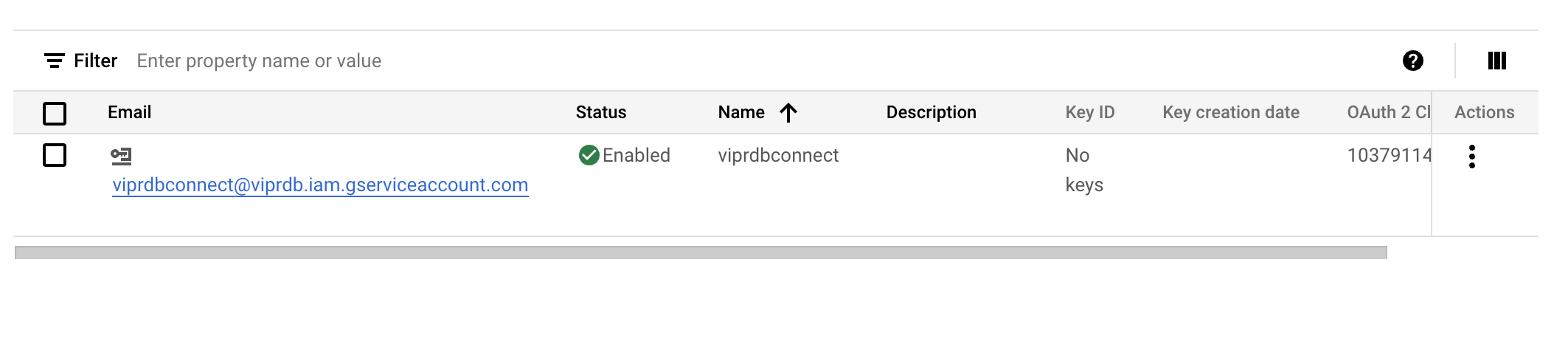
- Click on "Add Key" and choose the JSON type. The file will be automatically downloaded. Keep this file safe, as it will be used to authenticate the block.
- Grant access to the service account email to the Google Sheet. The service account will authenticate the requests to the Google Sheets API for the given sheet.
## Setting up the Google Sheet
- Identify the Google Sheet that you want to connect to.
- Share the Google Sheet with the service account email address you noted above. Viewer access is sufficient.
- Note down the Google Sheet ID from the URL. For example, in the URL `https://docs.google.com/spreadsheets/d/test_spreadsheet_id/edit?gid=0#gid=0`, the Google Sheet ID is `test_spreadsheet_id`. The Google Sheet ID is the unique identifier for the Google Sheet.
## Create the data source
1. Go to Settings > Remote Data Blocks in your WordPress admin.
2. Click on the "Connect new" button.
3. Choose "Google Sheets" from the dropdown menu as the data source type.
4. Name this data source (this name is only used internally).
5. Enter the contents of the JSON file you downloaded.
If the credentials are correct, you will be able to proceed to the other steps. If you receive an error, check the token and try again.
6. Select your desired spreadsheet and sheets.
7. Save the data source and return the data source list.
## Insert the block
Create or edit a page or post, then using the Block Inserter, search for the block using the name you provided in step four. You will notice both a loop and a single block are available.
The loop block will return all the entries in the spreadsheet.
## Patterns and styling
You can use patterns to create a consistent, reusable layout for your remote data. You can read more about [patterns](../extending/block-patterns.md).
Remote data blocks can be styled using the block editor's style settings, `theme.json`, or custom stylesheets. See the [example child theme](https://github.com/Automattic/remote-data-blocks/tree/trunk/example/templates/theme) for more details.
## Code reference
You can also configure Google Sheets integrations with code. These integrations appear in the WordPress admin but can not be modified. You may wish to do this to have more control over the data source or because you have more advanced data processing needs.
This [example template](https://github.com/Automattic/remote-data-blocks/tree/trunk/example/templates/google-sheets-block) will replicate what we've done in this tutorial.# Tutorials
This section will guide you through configuring data sources in the plugin settings and via code.
- [Airtable](airtable.md)
- [Google Sheets integration](google-sheets.md)
- [Shopify](shopify.md)
- [HTTP](http.md)# Local Development
This repository includes tools for starting a local development environment using [`@wordpress/env`](https://developer.wordpress.org/block-editor/reference-guides/packages/packages-env/), which requires Docker and Docker Compose. In addition, both `npm` and `composer` are required to install the local dependencies.
## Set up
Clone this repository and install its dependencies:.
```sh
npm install
```
To start a development environment with Xdebug enabled:
```sh
npm run dev
```
This will spin up a WordPress environment and a Valkey (Redis) instance for object cache. It will also build the block editor scripts, watch for changes, and open a Node.js debugging port. The WordPress environment will be available at `http://localhost:8888` (admin user: `admin`, password: `password`).
Stop the development environment with `Ctrl+C` and resume it by running the same command. You can also manually stop the environment with `npm run dev:stop`. Stopping the environment optionally stops the WordPress containers but preserves their state.
### Sharing configuration
Data sources configured via the Remote Data Blocks WordPress Admin UI are encrypted and stored as `remote_data_blocks_configs` in the Options table of the WordPress database.
If your local and production environments do not use the same encryption secrets, your configuration from one environment will not work in the other. Keep this in mind when migrating the database between environments.
### Testing
Run unit tests:
```sh
# all unit tests
npm run test
# only JavaScript unit tests
npm run test:js
# only PHP unit tests
npm run test:php
# only a specific test file
npm run test:js some/test/file.js
npm run test:php -- --filter SomeTestClass
```
For e2e tests, ensure the development environment is running, then execute:
```sh
npm run test:e2e
```
### Logs
Watch logs from the WordPress container:
```sh
npx wp-env logs
```
### WP-CLI
Run WP-CLI commands:
```sh
npm run wp-cli option get siteurl
```
### Destroy
Destroy your local environment and irreversibly delete all content, configuration, and data:
```sh
npm run dev:destroy
```
## Local playground
While not suitable for local developement, it can sometimes be useful to quickly spin up a local WordPress playground:
```sh
npm run build # or `npm start` in a separate terminal
npm run playground
```
Playgrounds do not closely mirror production environments and are missing persistent object cache, debugging tools, and other important features. Use `npm run dev` for local development.# Troubleshooting and debugging
This plugin provides a [local development environment](local-development.md) with built-in debugging tools.
## Query monitor
When the [Query Monitor plugin](https://wordpress.org/plugins/query-monitor/) is installed and activated, Remote Data Blocks will output debugging information to a dedicated "Remote Data Blocks" panel, including error details, stack traces, query execution details, and cache hit/miss status.
> [!TIP]
> By default, the block editor is rendered in "Fullscreen mode" which hides the Admin Bar and Query Monitor. Open the three-dot menu in the top-right corner and toggle off "Fullscreen mode", or press `⇧⌥⌘F`.
The provided local development environment includes Query Monitor by default. You can also install it in non-local environments, but be aware that it may expose sensitive information in production environments. Query Monitor is currently not compatible with WordPress Playground and cannot be installed there.
## Debugging
The [local development environment](local-development.md) includes Xdebug for debugging PHP code and a Node.js debugging port for debugging block editor scripts.
## Support
Our goal is to ensure that Remote Data Blocks works with as many APIs as possible. While we cannot guarantee that we can support every API, we are happy to receive detailed reports of any issues you encounter. Please [create a GitHub issue using the "API integration issue" template](https://github.com/Automattic/remote-data-blocks/issues/new?template=api_integration_issue.md) and we will do our best to assist you.
For general bugs, please [use the "General bug report" template](https://github.com/Automattic/remote-data-blocks/issues/new?template=bug_report.md). If you have feedback or suggestions for improvement, please [use the "Feedback" template](https://github.com/Automattic/remote-data-blocks/issues/new?template=general_feedback.md).
## Resetting config
If you need to reset the Remote Data Blocks configuration in your local development environment, you can use WP-CLI to delete the configuration option. This will permanently delete all configuration values, including access tokens and API keys.
```sh
npm run wp-cli option delete remote_data_blocks_config
```---
description: Project scope
globs:
alwaysApply: true
---
- You are writing code that integrates with the Remote Data Blocks WordPress plugin. This plugin allows you to create Gutenberg blocks that display data from remote data sources, such as Airtable, Google Sheets, Shopify, or your own API.
- You are not contributing to the plugin directly. You are writing code that will be used in a separate plugin or theme.
- You do not need to develop custom Gutenberg blocks. Instead, you will write simple PHP code to describe how your API should be queried, then call registration functions provided by the Remote Data Blocks plugin.
- Your goal is to configure and register a remote data block that displays remote data in an organized, visually appealing way.
- The Remote Data Blocks plugin provides a default block pattern for displaying data, but it is very basic. You may need to create a custom block pattern to achieve your goal, but please ask before doing so.
<?xml version="1.0" encoding="UTF-8" ?>
<!-- This is a WordPress eXtended RSS file generated by WordPress as an export of your site. -->
<!-- It contains information about your site's posts, pages, comments, categories, and other content. -->
<!-- You may use this file to transfer that content from one site to another. -->
<!-- This file is not intended to serve as a complete backup of your site. -->
<!-- To import this information into a WordPress site follow these steps: -->
<!-- 1. Log in to that site as an administrator. -->
<!-- 2. Go to Tools: Import in the WordPress admin panel. -->
<!-- 3. Install the "WordPress" importer from the list. -->
<!-- 4. Activate & Run Importer. -->
<!-- 5. Upload this file using the form provided on that page. -->
<!-- 6. You will first be asked to map the authors in this export file to users -->
<!-- on the site. For each author, you may choose to map to an -->
<!-- existing user on the site or to create a new user. -->
<!-- 7. WordPress will then import each of the posts, pages, comments, categories, etc. -->
<!-- contained in this file into your site. -->
<!-- generator="WordPress/6.8.1" created="2025-05-26 21:28" -->
<rss version="2.0"
xmlns:excerpt="http://wordpress.org/export/1.2/excerpt/"
xmlns:content="http://purl.org/rss/1.0/modules/content/"
xmlns:wfw="http://wellformedweb.org/CommentAPI/"
xmlns:dc="http://purl.org/dc/elements/1.1/"
xmlns:wp="http://wordpress.org/export/1.2/"
>
<channel>
<title>remote-data-blocks</title>
<link>http://localhost:8888</link>
<description></description>
<pubDate>Mon, 26 May 2025 21:28:18 +0000</pubDate>
<language>en-US</language>
<wp:wxr_version>1.2</wp:wxr_version>
<wp:base_site_url>http://localhost:8888</wp:base_site_url>
<wp:base_blog_url>http://localhost:8888</wp:base_blog_url>
<wp:author><wp:author_id>1</wp:author_id><wp:author_login><![CDATA[admin]]></wp:author_login><wp:author_email><![CDATA[wordpress@example.com]]></wp:author_email><wp:author_display_name><![CDATA[admin]]></wp:author_display_name><wp:author_first_name><![CDATA[]]></wp:author_first_name><wp:author_last_name><![CDATA[]]></wp:author_last_name></wp:author>
<generator>https://wordpress.org/?v=6.8.1</generator>
<item>
<title><![CDATA[👋 Welcome!]]></title>
<link>http://localhost:8888/?p=1</link>
<pubDate>Mon, 26 May 2025 21:15:05 +0000</pubDate>
<dc:creator><![CDATA[admin]]></dc:creator>
<guid isPermaLink="false">http://localhost:8888/?p=1</guid>
<description></description>
<content:encoded><![CDATA[<!-- wp:paragraph -->
<p>Here is an example of a <strong>remote data block</strong>. It is connected to an example API that returns events for an upcoming conference. If the data from that API changes—even after the post is published—this block will reflect those changes.</p>
<!-- /wp:paragraph -->
<!-- wp:separator -->
<hr class="wp-block-separator has-alpha-channel-opacity"/>
<!-- /wp:separator -->
<!-- wp:remote-data-blocks/conference-event {"remoteData":{"enabledOverrides":[],"blockName":"remote-data-blocks/conference-event","metadata":{"last_updated":{"name":"Last updated","type":"string","value":"2025-05-26 21:16:18"},"total_count":{"name":"Total count","type":"integer","value":1}},"pagination":[],"queryKey":"display","queryInputs":[{"record_id":"rec2uM1inwuvs9oPz"}],"resultId":"d23ffa9b-5e78-4857-aac9-027ed83f3f82","results":[{"result":{"id":{"name":"Record ID","type":"id","value":"rec2uM1inwuvs9oPz"},"title":{"name":"Title","type":"string","value":"Community building workshop"},"location":{"name":"Location","type":"string","value":"Emerald room"},"event_type":{"name":"Event type","type":"string","value":"Workshop"}},"uuid":"fc57a81e-0452-4c01-9a00-2d3fa6b13a37"}]}} -->
<div class="wp-block-remote-data-blocks-conference-event rdb-container"><!-- wp:remote-data-blocks/template -->
<!-- wp:heading {"metadata":{"bindings":{"content":{"source":"remote-data/binding","args":{"block":"remote-data-blocks/conference-event","field":"title"}}},"name":"Title"}} -->
<h2 class="wp-block-heading">Community building workshop</h2>
<!-- /wp:heading -->
<!-- wp:paragraph {"metadata":{"bindings":{"content":{"source":"remote-data/binding","args":{"block":"remote-data-blocks/conference-event","field":"location","label":"Location"}}},"name":"Location"},"className":"rdb-block-data-location"} -->
<p class="rdb-block-data-location">Emerald room</p>
<!-- /wp:paragraph -->
<!-- wp:paragraph {"metadata":{"bindings":{"content":{"source":"remote-data/binding","args":{"block":"remote-data-blocks/conference-event","field":"event_type","label":"Event type"}}},"name":"Event type"},"className":"rdb-block-data-event-type"} -->
<p class="rdb-block-data-event-type">Workshop</p>
<!-- /wp:paragraph -->
<!-- /wp:remote-data-blocks/template --></div>
<!-- /wp:remote-data-blocks/conference-event -->
<!-- wp:separator -->
<hr class="wp-block-separator has-alpha-channel-opacity"/>
<!-- /wp:separator -->
<!-- wp:paragraph -->
<p>We can also create <strong>inline bindings</strong> that represent remote data in the same way: <remote-data-blocks-inline-field data-query="{"remoteData":{"blockName":"remote-data-blocks/conference-event","queryInputs":[{"record_id":"recX9Ehj81QgVzeqX","title":"Lunch","location":"President's dining hall","event_type":"Meal"}],"metadata":{}},"selectedField":"title","type":"field"}">Lunch</remote-data-blocks-inline-field> will be held in the <remote-data-blocks-inline-field data-query="{"remoteData":{"blockName":"remote-data-blocks/conference-event","queryInputs":[{"record_id":"recX9Ehj81QgVzeqX","title":"Lunch","location":"President's dining hall","event_type":"Meal"}],"metadata":{}},"selectedField":"location","type":"field"}">President's dining hall</remote-data-blocks-inline-field>.</p>
<!-- /wp:paragraph -->
<!-- wp:paragraph -->
<p>Add another <strong>Conference Event</strong> block below and explore how data is selected and configured. Or use the <strong>[/]</strong> button in the formatting toolbar to create an inline binding.</p>
<!-- /wp:paragraph -->
<!-- wp:paragraph -->
<p>Read more in <a href="https://remotedatablocks.com/docs/">our documentation</a>!</p>
<!-- /wp:paragraph -->]]></content:encoded>
<excerpt:encoded><![CDATA[]]></excerpt:encoded>
<wp:post_id>1</wp:post_id>
<wp:post_date><![CDATA[2025-05-26 21:15:05]]></wp:post_date>
<wp:post_date_gmt><![CDATA[2025-05-26 21:15:05]]></wp:post_date_gmt>
<wp:post_modified><![CDATA[2025-05-26 21:15:05]]></wp:post_modified>
<wp:post_modified_gmt><![CDATA[2025-05-26 21:15:05]]></wp:post_modified_gmt>
<wp:comment_status><![CDATA[open]]></wp:comment_status>
<wp:ping_status><![CDATA[open]]></wp:ping_status>
<wp:post_name><![CDATA[hello-world]]></wp:post_name>
<wp:status><![CDATA[publish]]></wp:status>
<wp:post_parent>0</wp:post_parent>
<wp:menu_order>0</wp:menu_order>
<wp:post_type><![CDATA[post]]></wp:post_type>
<wp:post_password><![CDATA[]]></wp:post_password>
<wp:is_sticky>0</wp:is_sticky>
<category domain="category" nicename="uncategorized"><![CDATA[Uncategorized]]></category>
</item>
</channel>
</rss>
<?php declare(strict_types = 1);

namespace RemoteDataBlocks\Example\ArtInstituteOfChicago;

use function add_query_arg;

/**
 * Registers a remote data block representing an artwork from the Art Institute
 * of Chicago's public API.
 *
 * @see http://api.artic.edu/docs/
 */
function register_art_remote_data_block(): void {
	$aic_data_source = [
		'display_name' => 'Art Institute of Chicago',
		'endpoint' => 'https://api.artic.edu/api/v1/artworks',
		'request_headers' => [
			'Content-Type' => 'application/json',
		],
	];

	$get_art_query = [
		'display_name' => 'Get artwork by ID',
		'data_source' => $aic_data_source,
		// Provide a callable (closure) to dynamically generate the endpoint using
		// the base endpoint from the data source and the input variables.
		'endpoint' => function ( array $input_variables ) use ( $aic_data_source ): string {
			$endpoint = add_query_arg( [
				'fields' => 'id,title,image_id,artist_title',
			], $aic_data_source['endpoint'] );

			if ( is_array( $input_variables['id'] ) ) {
				$ids = implode( ',', $input_variables['id'] );
			} else {
				$ids = $input_variables['id'];
			}

			if ( ! empty( $ids ) ) {
				return add_query_arg( [ 'ids' => $ids ], $endpoint );
			}

			return $endpoint;
		},
		'input_schema' => [
			'id' => [
				'name' => 'Art ID',
				'type' => 'id:list', // This type indicates that the input can be a single ID or a list of IDs.
			],
		],
		'output_schema' => [
			'is_collection' => true,
			'path' => '$.data[*]',
			'type' => [
				'id' => [
					'name' => 'Art ID',
					'type' => 'id',
					'path' => '$.id',
				],
				'artist_title' => [
					'name' => 'Artist Title',
					'type' => 'string',
					'path' => '$.artist_title',
				],
				'title' => [
					'name' => 'Title',
					'type' => 'title',
					'path' => '$.title',
				],
				'image_url' => [
					'name' => 'Image URL',
					// Instead of a `path`, we provide a `generate` function to create the
					// image URL. The `$data` parameter contains the data returned from the
					// API at this "level" (e.g., after the root `path` has been applied).
					'generate' => static function ( $data ): string {
						return 'https://www.artic.edu/iiif/2/' . $data['image_id'] . '/full/843,/0/default.jpg';
					},
					'type' => 'image_url',
				],
			],
		],
	];

	$search_art_query = [
		'display_name' => 'Search artworks',
		'data_source' => $aic_data_source,
		// Provide a callable (closure) to dynamically generate the endpoint using
		// the base endpoint from the data source and the input variables.
		'endpoint' => function ( array $input_variables ) use ( $aic_data_source ): string {
			$endpoint = $aic_data_source['endpoint'] . '/search';
			$search_terms = $input_variables['search'] ?? '';

			// Do not include the `q` parameter if the search terms are empty.
			// Otherwise, this will result in an error from the API.
			if ( ! empty( $search_terms ) ) {
				$endpoint = add_query_arg( [ 'q' => $search_terms ], $endpoint );
			}

			return add_query_arg( [
				'limit' => $input_variables['limit'],
				'fields' => 'id,title,image_id,artist_title',
				'page' => $input_variables['page'],
			], $endpoint );
		},
		'input_schema' => [
			'search' => [
				'name' => 'Search terms',
				'type' => 'ui:search_input',
			],
			'limit' => [
				'default_value' => 10,
				'name' => 'Items per page',
				'type' => 'ui:pagination_per_page',
			],
			'page' => [
				'default_value' => 1,
				'name' => 'Starting page',
				'type' => 'ui:pagination_page',
			],
		],
		// Reuse the output schema from `$get_art_query`.
		'output_schema' => $get_art_query['output_schema'],
		'pagination_schema' => [
			'total_items' => [
				'name' => 'Total items',
				'path' => '$.pagination.total',
				'type' => 'integer',
			],
		],
	];

	register_remote_data_block( [
		'title' => 'Art Institute of Chicago',
		'icon' => 'art',
		'render_query' => [
			'query' => $get_art_query,
		],
		'selection_queries' => [
			[
				'query' => $search_art_query,
				'type' => 'search',
			],
		],
	] );
}
add_action( 'init', __NAMESPACE__ . '\\register_art_remote_data_block' );<!-- wp:columns {"align":"wide"} -->
<div class="wp-block-columns alignwide">
<!-- wp:column {"width":"25%"} -->
<div class="wp-block-column" style="flex-basis:25%">
<!-- wp:image {"metadata":{"bindings":{"url":{"source":"remote-data/binding","args":{"field":"cover_image_url"}},"alt":{"source":"remote-data/binding","args":{"field":"title","label":"Cover of"}}},"name":"Book Cover"},"className":"rdb-block-data-cover-image-url"} -->
<figure class="wp-block-image rdb-block-data-cover-image-url"><img alt=""/></figure>
<!-- /wp:image -->
</div>
<!-- /wp:column -->
<!-- wp:column {"width":"75%"} -->
<div class="wp-block-column" style="flex-basis:75%">
<!-- wp:heading {"metadata":{"bindings":{"content":{"source":"remote-data/binding","args":{"field":"title"}}},"name":"Title"}} -->
<h2 class="wp-block-heading"></h2>
<!-- /wp:heading -->
<!-- wp:paragraph {"metadata":{"bindings":{"content":{"source":"remote-data/binding","args":{"field":"author_name","label":"By"}}},"name":"Author"},"className":"rdb-block-data-author-name"} -->
<p class="rdb-block-data-author-name"></p>
<!-- /wp:paragraph -->
<!-- wp:paragraph {"metadata":{"bindings":{"content":{"source":"remote-data/binding","args":{"field":"first_publish_year","label":"First published"}}},"name":"Publication year"},"className":"rdb-block-data-first-publish-year"} -->
<p class="rdb-block-data-first-publish-year"></p>
<!-- /wp:paragraph -->
<!-- wp:paragraph {"metadata":{"bindings":{"content":{"source":"remote-data/binding","args":{"field":"edition_count","label":"Edition count"}}},"name":"Edition count"},"className":"rdb-block-data-edition-count"} -->
<p class="rdb-block-data-edition-count"></p>
<!-- /wp:paragraph -->
</div>
<!-- /wp:column -->
</div>
<!-- /wp:columns --><?php declare(strict_types = 1);
namespace RemoteDataBlocks\Example\OpenLibrary;
use function _n;
use function add_query_arg;
/**
* Registers a remote data block representing book information from the Open Library API.
* This block allows users to search for books and display detailed information including
* title, author, publication date, and cover image.
*
* @see https://openlibrary.org/dev/docs/api/search
*/
function register_open_library_remote_data_block(): void {
$open_library_data_source = [
'display_name' => 'Open Library',
'endpoint' => add_query_arg( [ 'fields' => 'key,title,author_name,first_publish_year,cover_i,edition_count' ], 'https://openlibrary.org/search.json' ),
'request_headers' => [
'Content-Type' => 'application/json',
],
];
$get_book_query = [
'data_source' => $open_library_data_source,
'display_name' => 'Get book details',
'endpoint' => function ( array $input_variables ) use ( $open_library_data_source ): string {
$work_key = $input_variables['work_key'] ?? '';
return add_query_arg( [ 'q' => $work_key ], $open_library_data_source['endpoint'] );
},
'input_schema' => [
'work_key' => [
'name' => 'Work Key',
'required' => true,
'type' => 'id',
],
],
'output_schema' => [
'is_collection' => false,
'path' => '$.docs[0]',
'type' => [
'work_key' => [
'name' => 'Work Key',
'path' => '$.key',
'type' => 'id',
],
'title' => [
'name' => 'Title',
'path' => '$.title',
'type' => 'title',
],
'author_name' => [
'name' => 'Author',
'path' => '$.author_name[0]',
'type' => 'string',
],
'first_publish_year' => [
'name' => 'First Published',
'path' => '$.first_publish_year',
'default_value' => 'Unknown',
'type' => 'string',
],
'cover_image_url' => [
'name' => 'Cover Image',
'generate' => static function ( array $data ): string {
$cover_id = $data['cover_i'] ?? null;
if ( $cover_id ) {
return "https://covers.openlibrary.org/b/id/{$cover_id}-M.jpg";
}
return '';
},
'type' => 'image_url',
],
'edition_count' => [
'name' => 'Editions',
'path' => '$.edition_count',
'default_value' => 0,
'format' => static function ( $value ): string {
$count = is_numeric( $value ) ? (int) $value : 0;
/* translators: %d is the number of book editions */
return sprintf( _n( '%d edition', '%d editions', $count ), $count );
},
'type' => 'string',
],
],
],
];
$search_books_query = [
'data_source' => $open_library_data_source,
'display_name' => 'Search books',
'endpoint' => function ( array $input_variables ) use ( $open_library_data_source ): string {
$search_terms = $input_variables['search'] ?? '';
$limit = $input_variables['limit'] ?? 10;
$page = $input_variables['page'] ?? 1;
$offset = ( $page - 1 ) * $limit;
$query_params = [
'limit' => $limit,
'offset' => $offset,
'fields' => 'key,title,author_name,first_publish_year,cover_i,edition_count',
];
if ( ! empty( $search_terms ) ) {
$query_params['q'] = $search_terms;
}
return add_query_arg( $query_params, $open_library_data_source['endpoint'] );
},
'input_schema' => [
'search' => [
'name' => 'Search terms',
'type' => 'ui:search_input',
],
'limit' => [
'default_value' => 10,
'name' => 'Items per page',
'type' => 'ui:pagination_per_page',
],
'page' => [
'default_value' => 1,
'name' => 'Starting page',
'type' => 'ui:pagination_page',
],
],
'output_schema' => [
'is_collection' => true,
'path' => '$.docs[*]',
'type' => [
'work_key' => [
'name' => 'Work Key',
'path' => '$.key',
'type' => 'id',
],
'title' => [
'name' => 'Title',
'path' => '$.title',
'type' => 'title',
],
'author_name' => [
'name' => 'Authors',
'path' => '$.author_name[0]',
'type' => 'string',
],
'first_publish_year' => [
'name' => 'First Published',
'path' => '$.first_publish_year',
'default_value' => 'Unknown',
'type' => 'string',
],
'cover_image_url' => [
'name' => 'Cover Image',
'generate' => static function ( array $data ): string {
$cover_id = $data['cover_i'] ?? null;
if ( $cover_id ) {
return "https://covers.openlibrary.org/b/id/{$cover_id}-M.jpg";
}
return '';
},
'type' => 'image_url',
],
'edition_count' => [
'name' => 'Editions',
'path' => '$.edition_count',
'default_value' => 0,
'format' => static function ( $value ): string {
$count = is_numeric( $value ) ? (int) $value : 0;
/* translators: %d is the number of book editions */
return sprintf( _n( '%d edition', '%d editions', $count ), $count );
},
'type' => 'string',
],
],
],
'pagination_schema' => [
'total_items' => [
'name' => 'Total items',
'path' => '$.numFound',
'type' => 'integer',
],
],
];
register_remote_data_block( [
'title' => 'Open Library Book',
'icon' => 'book',
'render_query' => [
'query' => $get_book_query,
],
'selection_queries' => [
[
'query' => $search_books_query,
'type' => 'search',
],
],
'patterns' => [
[
'title' => 'Book Details Layout',
'html' => file_get_contents( __DIR__ . '/patterns/book-pattern.html' ),
'role' => 'inner_blocks', // Bypass the pattern selection step.
],
],
] );
}
add_action( 'init', __NAMESPACE__ . '\\register_open_library_remote_data_block' );<!-- wp:group {"layout":{"type":"constrained"}} -->
<div class="wp-block-group github-file-content">
<!-- wp:paragraph {"metadata":{"bindings":{"content":{"source":"remote-data/binding","args":{"field":"file_content"}}},"name":"File Content"}} -->
<p></p>
<!-- /wp:paragraph -->
</div>
<!-- /wp:group --><?php declare(strict_types = 1);
namespace RemoteDataBlocks\Example\GitHub;
use RemoteDataBlocks\Config\Query\HttpQueryInterface;
use RemoteDataBlocks\Config\QueryRunner\QueryRunner;
use WP_Error;
defined( 'ABSPATH' ) || exit();
/**
* Custom query runner that process custom processing for GitHub API responses
* that return HTML / Markdown instead of JSON. This also provides custom
* processing to adjust embedded links.
*
* Data fetching and caching is still delegated to the parent QueryRunner class.
*/
class GitHubQueryRunner extends QueryRunner {
private string $default_file_extension = '.md';
public function execute( HttpQueryInterface $query, array $input_variables ): array|WP_Error {
$input_variables['file_path'] = $this->ensure_file_extension( $input_variables['file_path'] );
return parent::execute( $query, $input_variables );
}
/**
* @inheritDoc
*
* The API response is raw HTML, so we return an object construct containing
* the HTML as a property.
*/
protected function deserialize_response( string $raw_response_data, array $input_variables ): array {
return [
'content' => $raw_response_data,
'path' => $input_variables['file_path'],
];
}
private function ensure_file_extension( string $file_path ): string {
return str_ends_with( $file_path, $this->default_file_extension ) ? $file_path : $file_path . $this->default_file_extension;
}
}<?php declare(strict_types = 1);
namespace RemoteDataBlocks\Example\GitHub;
use DOMDocument;
use DOMElement;
use DOMXPath;
/**
* Updates the relative/absolute markdown links in href attributes.
* This adjusts the links so they work correctly when the file structure changes.
* - All relative paths go one level up.
* - All absolute paths are converted to relative paths one level up.
* - Handles URLs with fragment identifiers (e.g., '#section').
* - Removes the '.md' extension from the paths.
*
* @param string $html The HTML response data.
* @param string $current_file_path The current file's path.
* @return string The updated HTML response data.
*/
function update_markdown_links( string $html, string $current_file_path = '' ): string {
// Load the HTML into a DOMDocument
$dom = new DOMDocument();
// Convert HTML to UTF-8 using htmlspecialchars instead of mb_convert_encoding
$html = '<?xml encoding="UTF-8"?>' . $html;
// Suppress errors due to malformed HTML
// phpcs:ignore WordPress.PHP.NoSilencedErrors.Discouraged
@$dom->loadHTML( $html, LIBXML_HTML_NOIMPLIED | LIBXML_HTML_NODEFDTD );
// Create an XPath to query href attributes
$xpath = new DOMXPath( $dom );
// Query all elements with href attributes
$nodes = $xpath->query( '//*[@href]' );
foreach ( $nodes as $node ) {
if ( ! $node instanceof DOMElement ) {
continue;
}
$href = $node->getAttribute( 'href' );
// Check if the href is non-empty, points to a markdown file, and is a local path
if ( $href &&
preg_match( '/\.md($|#)/', $href ) &&
! preg_match( '/^(https?:)?\/\//', $href )
) {
// Adjust the path
$new_href = adjust_markdown_file_path( $href, $current_file_path );
// Set the new href
$node->setAttribute( 'href', $new_href );
}
}
// Remove the data attributes that GitHub uses for click-to-copy functionality.
// The DOM parser is unable to keep them encoded correctly.
$click_to_copy_attribute = 'data-snippet-clipboard-copy-content';
$nodes = $xpath->query( sprintf( '//*[@%s]', $click_to_copy_attribute ) );
foreach ( $nodes as $node ) {
if ( ! $node instanceof DOMElement ) {
continue;
}
$node->removeAttribute( $click_to_copy_attribute );
}
// Save and return the updated HTML without the XML declaration.
return preg_replace( '/^<\?xml[^>]+\?>/', '', $dom->saveHTML() );
}
/**
* Adjusts the markdown file path by resolving relative paths to absolute paths.
* Preserves fragment identifiers (anchors) in the URL.
*
* @param string $path The original path.
* @param string $current_file_path The current file's path.
* @return string The adjusted path.
*/
function adjust_markdown_file_path( string $path, string $current_file_path = '' ): string {
global $post;
$page_slug = $post->post_name;
// Parse the URL to separate the path and fragment
$parts = wp_parse_url( $path );
// Extract the path and fragment
$original_path = isset( $parts['path'] ) ? $parts['path'] : '';
$fragment = isset( $parts['fragment'] ) ? '#' . $parts['fragment'] : '';
// Get the directory of the current file
$current_dir = dirname( $current_file_path );
// Resolve the absolute path based on the current directory
if ( str_starts_with( $original_path, '/' ) ) {
// Already an absolute path from root, just remove leading slash
$absolute_path = ltrim( $original_path, '/' );
} else {
// Use realpath to resolve relative paths
$temp_path = $current_dir . '/' . $original_path;
$parts = explode( '/', $temp_path );
$absolute_parts = [];
foreach ( $parts as $part ) {
if ( '.' === $part || '' === $part ) {
continue;
}
if ( '..' === $part ) {
array_pop( $absolute_parts );
} else {
$absolute_parts[] = $part;
}
}
$absolute_path = implode( '/', $absolute_parts );
}
// Remove the .md extension
$absolute_path = preg_replace( '/\.md$/', '', $absolute_path );
// Ensure the path starts with a forward slash and includes the page slug
return '/' . $page_slug . '/' . $absolute_path . $fragment;
}<?php declare(strict_types = 1);
namespace RemoteDataBlocks\Example\ShopifyMockStore;
use RemoteDataBlocks\Integrations\Shopify\ShopifyDataSource;
use RemoteDataBlocks\Integrations\Shopify\ShopifyIntegration;
/**
* Registers a remote data block representing a product from Shopify's Mock Shop.
* This task can be completed in the plugin settings screen without writing code,
* but this template shows how to register it programmatically.
*
* @see https://mock.shop/
*/
function register_shopify_mock_store_blocks(): void {
$shopify_data_source = ShopifyDataSource::from_array( [
'service_config' => [
'__version' => 1,
'access_token' => '', // No access token needed for the mock store.
'display_name' => 'Shopify Mock Store',
'store_name' => 'mock.shop',
],
] );
ShopifyIntegration::register_blocks_for_shopify_data_source( $shopify_data_source );
}
add_action( 'init', __NAMESPACE__ . '\\register_shopify_mock_store_blocks' );<!-- wp:heading {"metadata":{"bindings":{"content":{"source":"remote-data/binding","args":{"block":"remote-data-blocks/weather","field":"location_name"}}},"name":"Location"}} -->
<h2 class="wp-block-heading"></h2>
<!-- /wp:heading -->
<!-- wp:paragraph {"metadata":{"bindings":{"content":{"source":"remote-data/binding","args":{"block":"remote-data-blocks/weather","field":"temperature_celsius","label":"Temperature (°C)"}}},"name":"Temperature (°C)"},"className":"rdb-block-data-temperature-celsius"} -->
<p class="rdb-block-data-temperature-celsius"></p>
<!-- /wp:paragraph -->
<!-- wp:paragraph {"metadata":{"bindings":{"content":{"source":"remote-data/binding","args":{"block":"remote-data-blocks/weather","field":"humidity","label":"Humidity (%)"}}},"name":"Humidity (%)"},"className":"rdb-block-data-humidity"} -->
<p class="rdb-block-data-humidity"></p>
<!-- /wp:paragraph -->
<!-- wp:paragraph {"metadata":{"bindings":{"content":{"source":"remote-data/binding","args":{"block":"remote-data-blocks/weather","field":"weather_description"}}},"name":"Weather Description"},"className":"rdb-block-data-weather-description"} -->
<p class="rdb-block-data-weather-description"></p>
<!-- /wp:paragraph -->
<!-- wp:paragraph {"metadata":{"bindings":{"content":{"source":"remote-data/binding","args":{"block":"remote-data-blocks/weather","field":"rain_prediction"}}},"name":"Rain Prediction"},"className":"rdb-block-data-rain-prediction"} -->
<p class="rdb-block-data-rain-prediction"></p>
<!-- /wp:paragraph --><?php declare(strict_types = 1);
namespace RemoteDataBlocks\Example\Weather;
use RemoteDataBlocks\Config\Query\HttpQuery;
defined( 'ABSPATH' ) || exit();
/**
* Convert weather code to human-readable description
* Based on OpenMeteo weather codes: https://open-meteo.com/en/docs
*/
function get_weather_description( int $code ): string {
$weather_codes = [
0 => 'Clear sky',
1 => 'Mainly clear',
2 => 'Partly cloudy',
3 => 'Overcast',
45 => 'Fog',
48 => 'Depositing rime fog',
51 => 'Light drizzle',
53 => 'Moderate drizzle',
55 => 'Dense drizzle',
56 => 'Light freezing drizzle',
57 => 'Dense freezing drizzle',
61 => 'Slight rain',
63 => 'Moderate rain',
65 => 'Heavy rain',
66 => 'Light freezing rain',
67 => 'Heavy freezing rain',
71 => 'Slight snow fall',
73 => 'Moderate snow fall',
75 => 'Heavy snow fall',
77 => 'Snow grains',
80 => 'Slight rain showers',
81 => 'Moderate rain showers',
82 => 'Violent rain showers',
85 => 'Slight snow showers',
86 => 'Heavy snow showers',
95 => 'Thunderstorm',
96 => 'Thunderstorm with slight hail',
99 => 'Thunderstorm with heavy hail',
];
return $weather_codes[ $code ] ?? 'Unknown';
}
/**
* Generate rain prediction based on precipitation probability
*/
function generate_rain_prediction( int $probability ): string {
if ( $probability >= 80 ) {
return 'It definitely looks like rain today!';
} elseif ( $probability >= 20 ) {
return 'It might rain today.';
} else {
return 'Rain is unlikely today.';
}
}
/**
* Registers a remote data block for fetching weather data from the OpenMeteo API.
* This block accepts a city name as input and returns current weather information
* including temperature, humidity, weather description, and rain prediction.
*
* @see https://open-meteo.com/en/docs
*/
function register_weather_remote_data_block(): void {
$openmeteo_data_source = [
'display_name' => 'OpenMeteo Weather API',
'endpoint' => 'https://api.open-meteo.com/v1/',
'request_headers' => [
'Content-Type' => 'application/json',
],
];
$get_geo_data_from_city_query = [
'data_source' => $openmeteo_data_source,
'display_name' => 'Get latitude and longitude from city name',
'endpoint' => function ( array $input_variables ): string {
return add_query_arg( [
'name' => $input_variables['city'],
'count' => 1,
'language' => 'en',
'format' => 'json',
], 'https://geocoding-api.open-meteo.com/v1/search' );
},
'input_schema' => [
'city' => [
'name' => 'City Name',
'type' => 'string',
'required' => true,
],
],
'output_schema' => [
'is_collection' => false,
'path' => '$.results[0]',
'type' => [
'country' => [
'name' => 'Country',
'path' => '$.country',
'type' => 'string',
],
'lat' => [
'name' => 'Latitude',
'path' => '$.latitude',
'type' => 'number',
],
'long' => [
'name' => 'Longitude',
'path' => '$.longitude',
'type' => 'number',
],
'name' => [
'name' => 'Name',
'path' => '$.name',
'type' => 'string',
],
],
],
];
$get_weather_query = [
'data_source' => $openmeteo_data_source,
'display_name' => 'Get weather by city name',
'endpoint' => function ( array $input_variables ) use ( $openmeteo_data_source, $get_geo_data_from_city_query ): string {
// Get latitude and longitude from the city name by executing a dependent
// query. This approach can avoid the need for a custom query runner or
// other complicated configuration.
//
// Using `HttpQuery` allows us to benefit from the caching layer, which is
// important since this code runs on every request before the object cache
// is checked.
$geo_data_query = HttpQuery::from_array( $get_geo_data_from_city_query );
$geo_data = $geo_data_query->execute( [ 'city' => $input_variables['city'] ] );
$latitude = $geo_data['results'][0]['result']['lat']['value'] ?? 'invalid';
$longitude = $geo_data['results'][0]['result']['long']['value'] ?? 'invalid';
// Construct and return weather API URL
return add_query_arg( [
'latitude' => $latitude,
'longitude' => $longitude,
'current' => 'temperature_2m,relative_humidity_2m,weather_code,precipitation_probability',
'timezone' => 'auto',
'temperature_unit' => 'celsius',
], $openmeteo_data_source['endpoint'] . 'forecast' );
},
'input_schema' => [
'city' => [
'name' => 'City Name',
'type' => 'string',
'required' => true,
],
],
'output_schema' => [
'is_collection' => false, // This query returns a single weather record
'type' => [
'location_name' => [
'name' => 'Location',
'type' => 'string',
'generate' => function ( array $_data, array $response_data ): string {
return $response_data['input_variables']['city'] ?? 'Unknown';
},
],
'temperature_celsius' => [
'name' => 'Temperature (°C)',
'type' => 'number',
'path' => '$.current.temperature_2m',
],
'temperature_fahrenheit' => [
'name' => 'Temperature (°F)',
'type' => 'number',
'generate' => function ( array $data ): float {
$temp_c = $data['current']['temperature_2m'] ?? 0;
return round( ( $temp_c * 9 / 5 ) + 32, 1 );
},
],
'weather_description' => [
'name' => 'Weather Description',
'type' => 'string',
'generate' => function ( array $data ): string {
$weather_code = $data['current']['weather_code'] ?? 0;
return get_weather_description( (int) $weather_code );
},
],
'humidity' => [
'name' => 'Humidity (%)',
'type' => 'integer',
'path' => '$.current.relative_humidity_2m',
],
'precipitation_probability' => [
'name' => 'Precipitation Probability (%)',
'type' => 'integer',
'path' => '$.current.precipitation_probability',
],
'rain_prediction' => [
'name' => 'Rain Prediction',
'type' => 'string',
'generate' => function ( array $data ): string {
$probability = $data['current']['precipitation_probability'] ?? 0;
return generate_rain_prediction( (int) $probability );
},
],
],
],
];
register_remote_data_block( [
'title' => 'Weather',
'icon' => 'cloud',
'render_query' => [
'query' => $get_weather_query,
],
// Supply a pattern for the block that will be used to display the weather
// data. This takes the place of the default pattern provided by the plugin.
'patterns' => [
[
'title' => 'Weather for city',
'html' => file_get_contents( __DIR__ . '/patterns/weather-block-pattern.html' ),
'role' => 'inner_blocks', // Bypass the pattern selection step.
],
],
] );
}
add_action( 'init', __NAMESPACE__ . '\\register_weather_remote_data_block' );<?php declare(strict_types = 1);
namespace RemoteDataBlocks\Example\ZipCode;
/**
* Registers a remote data block for fetching zip code information from the
* Zippopotam.us API.
*
* @see https://www.zippopotam.us/
*/
function register_zip_code_remote_data_block(): void {
$zip_code_data_source = [
'display_name' => 'Zip Code',
'endpoint' => 'https://api.zippopotam.us/us/',
];
$zip_code_query = [
'data_source' => $zip_code_data_source,
'display_name' => 'Get location by Zip code',
// Provide a callable (closure) to dynamically generate the endpoint using
// the base endpoint from the data source and the input variables.
'endpoint' => function ( array $input_variables ) use ( $zip_code_data_source ): string {
return $zip_code_data_source['endpoint'] . $input_variables['zip_code'];
},
'input_schema' => [
'zip_code' => [
'name' => 'Zip Code',
'type' => 'string',
],
],
'output_schema' => [
'is_collection' => false, // This query returns a single record.
'type' => [
'zip_code' => [
'name' => 'Zip Code',
'path' => '$["post code"]', // JSON property with space requires brackets and quotes.
'type' => 'string',
],
'city' => [
'name' => 'City',
'path' => '$.places[0]["place name"]', // JSON property with space requires brackets and quotes.
'type' => 'string',
],
'state' => [
'name' => 'State',
'path' => '$.places[0].state',
'type' => 'string',
],
],
],
];
register_remote_data_block( [
'title' => 'Zip Code',
'render_query' => [
'query' => $zip_code_query,
],
] );
}
add_action( 'init', __NAMESPACE__ . '\\register_zip_code_remote_data_block' );<?php
use RemoteDataBlocks\Integrations\Airtable\AirtableDataSource;
use RemoteDataBlocks\Integrations\Airtable\AirtableIntegration;
/**
* Registers a remote data block representing a row from a Airtable base. This
* task can be completed in the plugin settings screen without writing code, but
* this template shows how to register it programmatically -- possibly
* customizing the fields and their mappings.
*
* Replace the placeholders with your Airtable configuration details.
*/
function register_airtable_remote_data_block(): void {
$airtable_data_source = AirtableDataSource::from_array( [
'service_config' => [
'__version' => 1,
'access_token' => '{{ Access Token }}', // Airtable access token ("pat...")
'base' => [
'id' => '{{ Base ID }}', // Airtable base ID ("app...")
'name' => 'Conference Events',
],
'display_name' => 'Conference Events',
'tables' => [
[
'id' => '{{ Table ID }}', // Airtable table ID ("tbl...")
'name' => 'Conference Events',
// These mappings correspond to the columns of the table.
'output_query_mappings' => [
[
'key' => 'record_id',
'name' => 'ID',
'path' => '$.id',
'type' => 'id',
],
[
'key' => 'title',
'name' => 'Title',
'path' => '$.fields.Activity',
'type' => 'string',
],
[
'key' => 'type',
'name' => 'Type',
'path' => '$.fields.Type',
'type' => 'string',
],
[
'key' => 'location',
'name' => 'Location',
'path' => '$.fields.Location',
'type' => 'string',
],
[
'key' => 'notes',
'name' => 'Notes',
'path' => '$.fields.Notes',
'type' => 'string',
],
],
],
],
],
] );
AirtableIntegration::register_blocks_for_airtable_data_source( $airtable_data_source );
}
add_action( 'init', 'register_airtable_remote_data_block' );{
"$schema": "https://schemas.wp.org/trunk/block.json",
"apiVersion": 3,
"name": "example/leaflet-map",
"version": "1.0.0",
"title": "Leaflet Map",
"category": "widgets",
"icon": "location-alt",
"example": {},
"supports": {
"html": false
},
"textdomain": "remote-data-blocks-examples",
"editorScript": [ "file:./index.js", "leaflet-script" ],
"editorStyle": [ "leaflet-style" ],
"render": "file:./render.php",
"viewScript": [ "file:./view.js", "leaflet-script" ],
"viewStyle": [ "leaflet-style" ]
}import { useEffect } from '@wordpress/element';
import ServerSideRender from '@wordpress/server-side-render';
import metadata from './block.json';
import { initMaps } from './view';
/* global document */
/**
* The map elements are rendered differently in the block editor vs the WordPress
* frontend. This hook handles the differences.
*/
function useMapInit() {
useEffect( () => {
// In the block editor, the document can be iframed.
const parentDocument =
document.querySelector( 'iframe[name="editor-canvas"]' )?.contentDocument ?? document;
// Use an interval to make sure we get elements that might arrive "late" due
// to client-side rendering or because they are rendered in the block editor.
//
// Using `ServerSideRender` allows us to rely on the markup generated by
// `render.php`, which is good. But we don't have a way to know when the
// render is finished, so we need to poll.
const timer = setInterval( () => {
const mapElement = parentDocument.querySelector(
'.wp-block-example-leaflet-map[data-map-coordinates]'
);
if ( mapElement ) {
initMaps( [ mapElement ] );
clearInterval( timer );
}
}, 100 );
return () => clearInterval( timer );
}, [] );
}
export function Edit() {
useMapInit();
// ServerSideRender allows us to reuse the markup generated by `render.php`
// instead of duplicating the rendering logic in JavaScript.
return <ServerSideRender block={ metadata.name } />;
}/**
* Registers a new block provided a unique name and an object defining its behavior.
*
* @see https://developer.wordpress.org/block-editor/reference-guides/block-api/block-registration/
*/
import { registerBlockType } from '@wordpress/blocks';
/**
* Internal dependencies
*/
import metadata from './block.json';
import { Edit } from './edit';
registerBlockType( metadata.name, {
...metadata,
edit: Edit,
save: () => null, // A pure dynamic block only serializes its attributes.
} );import domReady from '@wordpress/dom-ready';
/* global document, leaflet */
export function initMaps( mapElements ) {
mapElements.forEach( element => {
const data = element?.dataset.mapCoordinates ?? '';
let coordinates = [];
try {
coordinates = JSON.parse( data ) ?? [];
} catch ( error ) {}
delete element.dataset.mapCoordinates;
const map = leaflet.map( element ).setView( [ coordinates[ 0 ].x, coordinates[ 0 ].y ], 25 );
const layerGroup = leaflet.layerGroup().addTo( map );
leaflet
.tileLayer( 'https://tile.openstreetmap.org/{z}/{x}/{y}.png', { maxZoom: 4 } )
.addTo( map );
coordinates
.filter( location => location.x && location.y )
.forEach( location => {
leaflet.marker( [ location.x, location.y ], { title: location.name } ).addTo( layerGroup );
} );
map.flyTo( [ coordinates[ 0 ].x, coordinates[ 0 ].y ] );
} );
}
// When the document is ready, find all maps and initialize them with Leaflet.
domReady( () => {
initMaps( document.querySelectorAll( '.wp-block-example-leaflet-map[data-map-coordinates]' ) );
} );/build/
/node_modules/
/package-lock.json
<?php

function register_leaflet_map_remote_data_block(): void {
	// Register the Leaflet script and stylesheet. The handles are referenced in
	// `block.json` for use in the block editor and the WordPress frontend.
	wp_register_style( 'leaflet-style', 'https://unpkg.com/leaflet@1.9.4/dist/leaflet.css', [], '1.9.4' );
	wp_register_script( 'leaflet-script', 'https://unpkg.com/leaflet@1.9.4/dist/leaflet.js', [], '1.9.4', true );

	/**
	 * Registers the block(s) metadata from the `blocks-manifest.php` and registers the block type(s)
	 * based on the registered block metadata.
	 * Added in WordPress 6.8 to simplify the block metadata registration process added in WordPress 6.7.
	 *
	 * @see https://make.wordpress.org/core/2025/03/13/more-efficient-block-type-registration-in-6-8/
	 */
	wp_register_block_types_from_metadata_collection( __DIR__ . '/build', __DIR__ . '/build/blocks-manifest.php' );
}
add_action( 'init', 'register_leaflet_map_remote_data_block' );{
"name": "map-block",
"version": "0.1.0",
"description": "Example block scaffolded with Create Block tool.",
"author": "The WordPress Contributors",
"license": "GPL-2.0-or-later",
"main": "build/index.js",
"scripts": {
"build": "wp-scripts build --blocks-manifest",
"format": "wp-scripts format",
"lint:css": "wp-scripts lint-style",
"lint:js": "wp-scripts lint-js",
"packages-update": "wp-scripts packages-update",
"plugin-zip": "wp-scripts plugin-zip",
"start": "wp-scripts start --blocks-manifest"
},
"devDependencies": {
"@wordpress/blocks": "14.13.0",
"@wordpress/dom-ready": "4.24.0",
"@wordpress/scripts": "^30.17.0"
}
}# Example: "Leaflet Map" block
This example illustrates the flexibility of the Remote Data Blocks plugin. Instead of registering a block via `register_remote_data_block`, this example builds a custom dynamic block that uses the [Leaflet library](https://leafletjs.com) to display a map with marked locations.
The map locations are loaded from an Airtable base that contains longitude and latitude coordinates. Instead of using block bindings, this example creates a data source and a query and executes it manually in `render.php`.
The result is a registered "Leaflet Map" block that renders remote data in the block editor and on the WordPress frontend.
<p><img width="700" alt="A Leaflet Map block in the block editor" src="https://github.com/user-attachments/assets/25f23e1a-2088-4b7e-896a-781c656294a5" /></p>
<p><img width="700" alt="A Leaflet Map block in the WordPress frontend" src="https://github.com/user-attachments/assets/979e60ae-c5f4-47f4-8cd8-69c5d3fa2c52" /></p>
## Build step
Because the custom block uses JSX, it requires a build step: `npm run build`.
If you want to adapt this example code in your own codebase, we recommend using [the `@wordpress/create-block` utility](https://developer.wordpress.org/block-editor/reference-guides/packages/packages-create-block/) to scaffold your custom block.<?php
use RemoteDataBlocks\Integrations\Google\Sheets\GoogleSheetsDataSource;
use RemoteDataBlocks\Integrations\Google\Sheets\GoogleSheetsIntegration;
/**
* Registers a remote data block representing a row from a Google Sheet. This
* task can be completed in the plugin settings screen without writing code, but
* this template shows how to register it programmatically -- possibly
* customizing the fields and their mappings.
*
* Replace the placeholders with your Google configuration details.
*
* @see /docs/tutorials/google-sheets.md
*/
function register_google_sheets_remote_data_block(): void {
// TODO: Replace the following placeholders with your actual values.
$encoded_credentials = '{{ Base 64-encoded JSON credentials }}';
$spreadsheet_id = '{{ Spreadsheet ID }}';
$sheet_id = '{{ Sheet ID / GID }}'; // e.g., '1'
$sheet_name = 'Houses';
$credentials = json_decode( base64_decode( $encoded_credentials ), true );
$westeros_houses_data_source = GoogleSheetsDataSource::from_array( [
'service_config' => [
'__version' => 1,
'credentials' => $credentials,
'display_name' => 'Westeros Houses',
'spreadsheet' => [
'id' => $spreadsheet_id,
],
'sheets' => [
[
'id' => $sheet_id,
'name' => $sheet_name,
// These mappings correspond to the columns of the table.
'output_query_mappings' => [
[
'key' => 'row_id',
'name' => 'Row ID',
'path' => '$.RowId',
'type' => 'id',
],
[
'key' => 'house',
'name' => 'House',
'path' => '$.House',
'type' => 'string',
],
[
'key' => 'seat',
'name' => 'Seat',
'path' => '$.Seat',
'type' => 'string',
],
[
'key' => 'region',
'name' => 'Region',
'path' => '$.Region',
'type' => 'string',
],
[
'key' => 'words',
'name' => 'Words',
'path' => '$.Words',
'type' => 'string',
],
[
'key' => 'image_url',
'name' => 'Sigil',
'path' => '$.Sigil',
'type' => 'image_url',
],
],
],
],
],
] );
GoogleSheetsIntegration::register_blocks_for_google_sheets_data_source( $westeros_houses_data_source );
}
add_action( 'init', 'register_google_sheets_remote_data_block' );<?php
use RemoteDataBlocks\Integrations\Shopify\ShopifyDataSource;
use RemoteDataBlocks\Integrations\Shopify\ShopifyIntegration;
/**
* Registers a remote data block representing a product from a Shopify store.
* This task can be completed in the plugin settings screen without writing code,
* but this template shows how to register it programmatically.
*
* Replace the placeholders with your Shopify access token and store name.
*/
function register_shopify_remote_data_block(): void {
$shopify_data_source = ShopifyDataSource::from_array( [
'service_config' => [
'__version' => 1,
'access_token' => '{{ Access Token }}',
'display_name' => '{{ Shopify Store Display Name }}',
'store_name' => '{{ store-name.myshopify.com }}',
],
] );
ShopifyIntegration::register_blocks_for_shopify_data_source( $shopify_data_source );
}
add_action( 'init', 'register_shopify_remote_data_block' );<?php declare(strict_types = 1);
namespace RemoteDataBlocks\Example\Theme;
use function add_action;
use function get_stylesheet_directory_uri;
use function wp_enqueue_style;
use function wp_get_theme;
defined( 'ABSPATH' ) || exit();
/**
* Enqueue the Remote Data Blocks styles.
*/
function remote_data_blocks_example_theme_enqueue_block_styles(): void {
wp_enqueue_style(
'remote-data-blocks-example-theme-style',
get_stylesheet_directory_uri() . '/style-remote-data-blocks.css',
[],
wp_get_theme()->get( 'Version' )
);
}
add_action( 'wp_enqueue_scripts', __NAMESPACE__ . '\\remote_data_blocks_example_theme_enqueue_block_styles', 15, 0 );
add_action( 'enqueue_block_assets', __NAMESPACE__ . '\\remote_data_blocks_example_theme_enqueue_block_styles', 15, 0 );# Remote Data Blocks Example Theme
This folder contains a simple example theme that provides custom styling of Remote Data Blocks via a `theme.json` file. It is a child theme of `twentytwentyfour` and delegates all rendering to the parent theme./**
* This file may also contain CSS overrides that are difficult or impossible to
* implement using `theme.json` alone. For example, each bound inner block of a
* Remote Data Block has a class name corresponding to the field it is bound to.
*
* Therefore, a Remote Data Block named "Shopify Product" containing a paragraph
* block bound to a field named `description` can be targeted with a selector:
*
* .wp-block-remote-data-blocks-shopify-product p.rdb-block-data-description {
* /* styles here * /
* }
*/
.wp-block-remote-data-blocks-shopify-product p.rdb-block-data-price {
font-weight: 700;
}/*!
* Theme Name: Remote Data Blocks Example Theme
* Description: Example theme that provides styling for remote data blocks
* Version: 1.0.0
* Template: twentytwentyfour
* Tags: remote-data-blocks
* Text Domain: remote-data-blocks
* Tested up to: 6.6
* Requires at least: 6.6
* Requires PHP: 8.1
* License: GNU General Public License v2.0
* License URI: https://www.gnu.org/licenses/gpl-2.0.html
*/
/* This file is not enqueued and exists only to provide the theme manifest. */{
"$schema": "https://schemas.wp.org/trunk/theme.json",
"version": 3,
"settings": {
"blocks": {
"remote-data-blocks/conference-event": {
"custom": {
"remote-data-blocks": {}
}
}
}
},
"styles": {
"elements": {},
"blocks": {
"remote-data-blocks/conference-event": {
"color": {
"background": "#e9c9f9",
"text": "#290939"
},
"css": "& p { margin: 0.25rem 0; }",
"shadow": "rgb(38, 57, 77) 0px 20px 30px -10px",
"spacing": {
"margin": {
"bottom": "2rem",
"top": "2rem"
},
"padding": {
"bottom": "1.5rem",
"left": "1.5rem",
"right": "1.5rem",
"top": "1.5rem"
}
},
"typography": {
"fontFamily": "Inter, Helvetica Neue, Helvetica, Arial, sans-serif",
"fontSize": "1.25rem"
},
"elements": {
"heading": {
"border": {
"bottom": {
"color": "#593969",
"style": "solid",
"width": "3px"
}
},
"color": {
"text": "#290939"
},
"spacing": {
"margin": {
"top": "0.5rem"
},
"padding": {
"bottom": "0.5rem"
}
},
"typography": {
"fontFamily": "Inter, Helvetica Neue, Helvetica, Arial, sans-serif",
"fontSize": "2rem",
"fontWeight": "800"
}
}
}
},
"remote-data-blocks/shopify-product": {
"css": "& .wp-block-columns { flex-direction: row-reverse }",
"spacing": {
"margin": {
"bottom": "2rem",
"top": "2rem"
},
"padding": {
"bottom": "1.5rem",
"left": "1.5rem",
"right": "1.5rem",
"top": "1.5rem"
}
},
"typography": {
"fontSize": "1rem"
},
"elements": {
"heading": {
"color": {
"text": "#290939"
},
"spacing": {
"margin": {
"top": "0.5rem"
},
"padding": {
"bottom": "0.5rem"
}
},
"typography": {
"fontFamily": "Helvetica Neue, Helvetica, Arial, sans-serif",
"fontSize": "1.25rem",
"fontWeight": "900"
}
}
}
}
}
}
}# Example code and templates
The example code and templates in this directory can help you get started with the Remote Data Blocks plugin. Note that many tasks can be performed in the UI without writing any code. However, other tasks require custom code, especially when you want to work with generic REST APIs or customize the block output or behavior.
## Block examples
These blocks communicate with APIs that do not require authentication. Uncomment lines at the end of `remote-data-blocks.php` to enable them. They are roughly in order of complexity, starting with the simplest.
- [Zip Code block](./blocks/zip-code-block/zip-code-block.php)
- [Art block](./blocks/art-block/art-block.php)
- [Shopify Mock Store block](./blocks/shopify-mock-store-block/shopify-mock-store-block.php)
- [Book block](./blocks/book-block/book-block.php)
- [Weather block](./blocks/weather-block/weather-block.php)
- [GitHub Markdown File block](./blocks/github-markdown-block/github-markdown-block.php)
## Templates
These code templates require credentials and other customization to work. They are a useful starting point for exploration and are especially useful as context for AI agents.
- [REST API block](templates/rest-api-block)
- [REST API block from UI-created data source](templates/rest-api-block-from-ui-data-source)
- [Airtable block](templates/airtable-block)
- [Airtable map block](templates/airtable-map-block)
- [Google Sheets block](templates/google-sheets-block)
- [Shopify Product block](templates/shopify-product-block)
- [Example child theme](templates/theme)# Create a remote data block using an HTTP data source
This page will walk you through registering a remote data block that loads data from a Zip code REST API. It will require you to commit code to a WordPress theme or plugin.
## Create the data source
1. Go to Settings > Remote Data Blocks in your WordPress admin.
2. Click on the "Connect new" button.
3. Choose "HTTP" from the dropdown menu as the data source type.
4. Fill in the following details:
- Data Source Name: Zip Code API
- URL: https://api.zippopotam.us/us/
5. If your API requires authentication, enter those details. This API does not.
6. Save the data source and return the data source list.
7. In the Actions column, click the three-dot menu, then "Copy UUID" to copy the data source's UUID to your clipboard.
## Register the block
Next, define a query and register a block using the data source you just created. Add this code to your theme's `functions.php` file or a custom plugin, replacing `{{ Data source UUID }}` with the UUID you copied from the data source list.
```php
<?php
use RemoteDataBlocks\Config\DataSource\HttpDataSource;
function register_zip_code_remote_data_block(): void {
$zip_code_data_source = HttpDataSource::from_uuid( '{{ Data source UUID }}' );
if ( is_wp_error( $zip_code_data_source ) ) {
return;
}
$zip_code_query = [
'data_source' => $zip_code_data_source,
'display_name' => 'Get location by Zip code',
'endpoint' => function ( array $input_variables ) use ( $zip_code_data_source ): string {
return $zip_code_data_source->get_endpoint() . $input_variables['zip_code'];
},
'input_schema' => [
'zip_code' => [
'name' => 'Zip Code',
'type' => 'string',
],
],
'output_schema' => [
'is_collection' => false,
'type' => [
'zip_code' => [
'name' => 'Zip Code',
'path' => '$["post code"]',
'type' => 'string',
],
'city' => [
'name' => 'City',
'path' => '$.places[0]["place name"]',
'type' => 'string',
],
'state' => [
'name' => 'State',
'path' => '$.places[0].state',
'type' => 'string',
],
],
],
];
register_remote_data_block( [
'title' => 'Zip Code',
'render_query' => [
'query' => $zip_code_query,
],
] );
}
add_action( 'init', 'register_zip_code_remote_data_block' );
```
This code:
1. Loads the data source by UUID using `HttpDataSource::from_uuid()`.
2. Defines a render query that accepts a zip code, appends it to the data source endpoint, and maps the response fields to block outputs.
3. Registers a "Zip Code" block that uses the render query.
For example, if the editor provides `90210`, the query requests `https://api.zippopotam.us/us/90210` and maps the `post code`, `place name`, and `state` fields from the API response.
## Insert the block
Create or edit a page or post, then search for "Zip Code" in the block inserter. After inserting the block, enter a valid US zip code, such as `90210`, to fetch and display location data.
## Patterns and styling
The plugin registers an unstyled block pattern for each remote data block. You can duplicate that default pattern in the Site Editor and associate a custom pattern with your block later. Read more in [Block patterns](../extending/block-patterns.md).
Remote data blocks can also be styled with the block editor's style settings, `theme.json`, or custom stylesheets.
## Code reference
The [Zip Code block example](https://github.com/Automattic/remote-data-blocks/tree/trunk/example/blocks/zip-code-block/zip-code-block.php) shows a similar block with the data source defined entirely in code.
The [REST API block from UI-created data source template](https://github.com/Automattic/remote-data-blocks/tree/trunk/example/templates/rest-api-block-from-ui-data-source) shows a larger template for APIs that need both render and selection queries.# Create a Shopify remote data block
This tutorial will walk you through connecting a [Shopify](https://www.shopify.com/) data source and how to use the automatically created block in the WordPress editor.
## Shopify API Access
To use the Shopify data source, you need a Storefront API access token for the store you want to connect. Remote Data Blocks queries Shopify's Storefront API, so the token must include the `unauthenticated_read_product_listings` scope. This allows Remote Data Blocks to read products and collections without requesting broader Admin API permissions.
For new stores, follow Shopify's current [Storefront API getting started guide](https://shopify.dev/docs/storefronts/headless/building-with-the-storefront-api/getting-started):
1. Log in to your Shopify admin account.
2. Install the Headless sales channel.
3. Create a storefront to generate Storefront API access tokens.
4. Edit the storefront's Storefront API permissions and enable product listing access. In Shopify API scope terms, this is `unauthenticated_read_product_listings`.
5. Copy the private Storefront API access token.
If you are using a custom app created in Shopify's Dev Dashboard after January 1, 2026, follow Shopify's [Dev Dashboard access token guide](https://shopify.dev/docs/apps/build/dev-dashboard/get-api-access-tokens) to create and install the app, request the `unauthenticated_read_product_listings` Storefront API scope, and exchange your app credentials for an access token. Use that token with Shopify's [`storefrontAccessTokenCreate` mutation](https://shopify.dev/docs/api/admin-graphql/latest/mutations/storefrontAccessTokenCreate) to create the Storefront API access token for Remote Data Blocks. Do not paste the short-lived Admin API access token into Remote Data Blocks. Existing admin-created custom apps can continue using their existing Storefront API access tokens.
## Create the data source
1. Go to Settings > Remote Data Blocks in your WordPress admin.
2. Click on the "Connect new" button.
3. Choose "Shopify" from the dropdown menu as the data source type.
4. Name the data source. This name is only used for display purposes.
5. Enter the subdomain of your Shopify store. To find this, log into Shopify, the subdomain of your store is the portion of the URL before `myshopify.com`.
6. Enter your access token.
If the credentials are correct, you can save the data source. If you receive an error, check the token and try again.
## Insert the block
Create or edit a page or post, then using the Block Inserter, search for the block using the name you provided in step four.
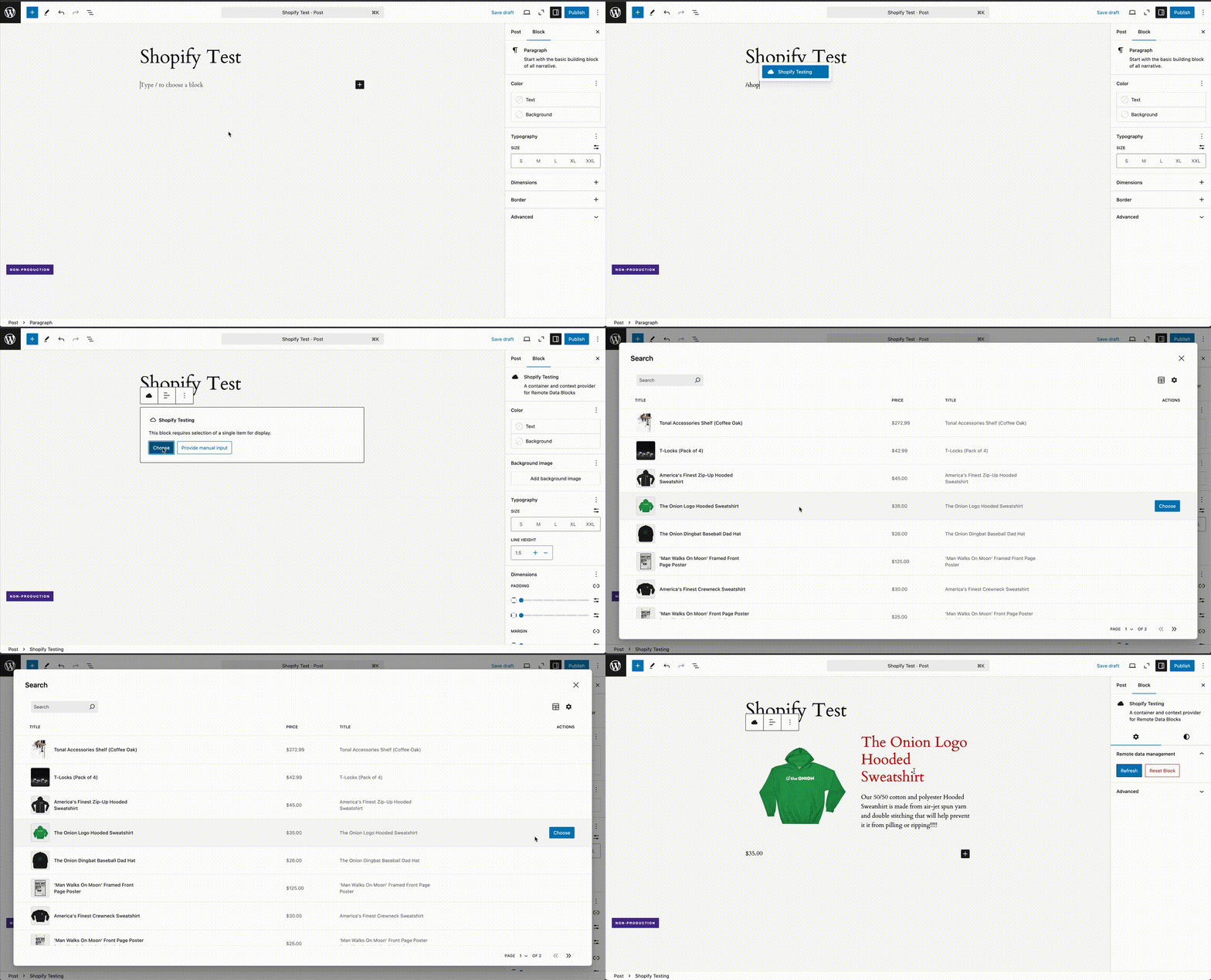
## Patterns and styling
You can use patterns to create a consistent, reusable layout for your remote data. You can read more about [patterns](../extending/block-patterns.md).
Remote data blocks can be styled using the block editor's style settings, `theme.json`, or custom stylesheets. See the [example child theme](https://github.com/Automattic/remote-data-blocks/tree/trunk/example/templates/theme) for more details.
## Code reference
You can also configure Shopify integrations with code. These integrations appear in the WordPress admin but can not be modified. You may wish to do this to have more control over the data source or because you have more advanced data processing needs.
This [working example](https://github.com/Automattic/remote-data-blocks/tree/trunk/example/templates/shopify-product-block) will replicate what we've done in this tutorial.<?php declare(strict_types = 1);
namespace RemoteDataBlocks\Example\GitHub;
use RemoteDataBlocks\Integrations\GitHub\GitHubDataSource;
require_once __DIR__ . '/inc/github-query-runner.php';
require_once __DIR__ . '/inc/markdown-links.php';
/**
* Registers a remote data block for rendering Markdown files from a public
* GitHub repository.
*
* HttpQuery expects APIs to return JSON, but we instruct GitHub's API to return
* HTML (converted from Markdown). To handle this, we provide a custom query
* runner to handle the HTML response and update Markdown links.
*
* @docs /docs/extending/query.md
*/
function register_github_markdown_remote_data_block(): void {
$repo_owner = 'Automattic';
$repo_name = 'remote-data-blocks';
$repo_ref = 'trunk';
// Note: This repository is public, so GitHub's API does not require authorization.
$github_data_source = [
// Target a subclass of HttpDataSource for instantiation.
'__class' => GitHubDataSource::class,
'service_config' => [
'__version' => 1,
'display_name' => 'GitHub Markdown (Remote Data Blocks)',
'repo_owner' => $repo_owner,
'repo_name' => $repo_name,
'ref' => $repo_ref,
],
];
$block_title = sprintf( 'GitHub Markdown File (%s/%s)', $repo_owner, $repo_name );
$file_extension = '.md';
$get_file_as_html_query = [
'display_name' => 'Get GitHub Markdown file as HTML',
'data_source' => $github_data_source,
'cache_key_request_headers' => [ 'Accept' ],
// Provide a callable (closure) to dynamically generate the endpoint using
// variables in the outer scope and the input variables.
'endpoint' => function ( array $input_variables ) use ( $repo_owner, $repo_name, $repo_ref ): string {
return sprintf(
'https://api.github.com/repos/%s/%s/contents/%s?ref=%s',
$repo_owner,
$repo_name,
$input_variables['file_path'],
$repo_ref
);
},
'input_schema' => [
'file_path' => [
'name' => 'File Path',
'type' => 'string',
],
],
'output_schema' => [
'is_collection' => false,
'type' => [
'file_content' => [
'name' => 'File Content',
// Instead of a `path`, we provide a `generate` function to create the
// image URL.
'generate' => static function ( array $data ): string {
// Update the markdown links so that they point to the correct location.
return update_markdown_links( $data['content'], $data['path'] );
},
'type' => 'html',
],
'file_path' => [
'name' => 'File Path',
'path' => '$.path',
'type' => 'string',
],
],
],
'request_headers' => [
// This request header instructs GitHub's API to convert the Markdown to HTML.
'Accept' => 'application/vnd.github.html+json',
],
// A custom query runner allows us to work with raw HTML responses (instead of JSON).
'query_runner' => new GitHubQueryRunner(),
];
$get_list_files_query = [
'display_name' => 'List GitHub Markdown files',
'data_source' => $github_data_source,
'input_schema' => [
'file_extension' => [
'name' => 'File Extension',
'type' => 'string',
],
],
'output_schema' => [
'is_collection' => true,
'path' => sprintf( '$.tree[?(@.path =~ /\\.%s$/)]', ltrim( $file_extension, '.' ) ),
'type' => [
'file_path' => [
'name' => 'File Path',
'path' => '$.path',
'type' => 'string',
],
'sha' => [
'name' => 'SHA',
'path' => '$.sha',
'type' => 'string',
],
'size' => [
'name' => 'Size',
'path' => '$.size',
'type' => 'integer',
],
'url' => [
'name' => 'URL',
'path' => '$.url',
'type' => 'string',
],
],
],
];
register_remote_data_block( [
'title' => $block_title,
'render_query' => [
'query' => $get_file_as_html_query,
],
'selection_queries' => [
[
'query' => $get_list_files_query,
'type' => 'list',
],
],
'overrides' => [
[
'name' => 'github_file_path',
'display_name' => __( 'Use GitHub file path from URL', 'rdb-example' ),
'help_text' => __( 'Enable this override when using this block on the /gh/ page.', 'rdb-example' ),
],
],
'patterns' => [
[
'html' => file_get_contents( __DIR__ . '/inc/patterns/file-render.html' ),
'role' => 'inner_blocks', // Bypass the pattern selection step.
'title' => 'GitHub File Render',
],
],
] );
}
add_action( 'init', __NAMESPACE__ . '\\register_github_markdown_remote_data_block' );
/**
* Adds a rewrite rule and filters the query vars to create a dynamic page that
* will display the requested markdown file from the GitHub repository.
*/
function handle_github_file_path_override(): void {
// This rewrite targets a page with the slug "gh", which must be created!
add_rewrite_rule( '^gh/(.+)/?', 'index.php?pagename=gh&file_path=$matches[1]', 'top' );
// Add the "file_path" query variable to the list of recognized query variables.
add_filter( 'query_vars', function ( array $query_vars ): array {
$query_vars[] = 'file_path';
return $query_vars;
}, 10, 1 );
// Filter the query input variables to inject the "file_path" value from the
// URL. Note that the override must match the override name defined in the
// block registration above.
add_filter( 'remote_data_blocks_query_input_variables', function ( array $input_variables, array $enabled_overrides ): array {
if ( true === in_array( 'github_file_path', $enabled_overrides, true ) ) {
$file_path = get_query_var( 'file_path' );
if ( ! empty( $file_path ) ) {
$input_variables['file_path'] = $file_path;
}
}
return $input_variables;
}, 10, 2 );
}
add_action( 'init', __NAMESPACE__ . '\\handle_github_file_path_override' );<?php
use RemoteDataBlocks\Integrations\Airtable\AirtableDataSource;
use RemoteDataBlocks\Integrations\Airtable\AirtableIntegration;
use RemoteDataBlocks\Config\Query\HttpQuery;
$access_token = '{{ Airtable access token }}'; // Airtable access token ("pat...")
$base_id = '{{ Airtable base ID }}'; // Airtable base ID ("app...")
$table_id = '{{ Airtable table ID }}'; // Airtable table ID ("tbl...")
$table = [
'id' => $table_id,
'name' => 'Map locations',
'output_query_mappings' => [
[
'key' => 'id',
'name' => 'ID',
'path' => '$.id',
'type' => 'id',
],
[
'key' => 'name',
'name' => 'Location name',
'path' => '$.fields.Name',
'type' => 'string',
],
[
'key' => 'x',
'name' => 'Latitude',
'path' => '$.fields.x',
'type' => 'number',
],
[
'key' => 'y',
'name' => 'Longitude',
'path' => '$.fields.y',
'type' => 'number',
],
],
];
$map_data_source = AirtableDataSource::from_array( [
'service_config' => [
'__version' => 1,
'access_token' => $access_token,
'base' => [
'id' => $base_id,
'name' => 'Map locations',
],
'display_name' => 'Map locations',
'tables' => [ $table ],
],
] );
$coordinates = [];
if ( ! is_wp_error( $map_data_source ) ) {
$get_locations_query = HttpQuery::from_array( AirtableIntegration::get_list_query( $map_data_source, $table ) );
$response = is_wp_error( $get_locations_query ) ? $get_locations_query : $get_locations_query->execute( [] );
if ( ! is_wp_error( $response ) ) {
$coordinates = array_map( function ( $value ) {
$result = $value['result'];
return [
'name' => $result['name']['value'],
'x' => $result['x']['value'],
'y' => $result['y']['value'],
];
}, $response['results'] );
}
}
?>
<div
<?php echo get_block_wrapper_attributes(); ?>
data-map-coordinates="<?php echo( esc_attr( wp_json_encode( $coordinates ) ) ); ?>"
style="height: 400px;"
>
</div><?php
/**
* Register a remote data block that uses a basic REST API. Customize the data
* source, queries, and schemas to match your specific API requirements.
*/
function register_basic_rest_api_remote_data_block(): void {
$api_data_source = [
'display_name' => '{{ API Name }}',
'endpoint' => '{{ API Base URL }}',
'request_headers' => [
'Content-Type' => 'application/json',
// TODO: Add authentication headers, if needed.
// 'Authorization' => 'Bearer {{ API token }}',
// 'X-API-Key' => '{{ API key }}',
],
];
// Get item query: Fetch one record by ID.
$get_item_query = [
'display_name' => 'Get item by ID',
'data_source' => $api_data_source,
// Include every custom request header above that can affect authentication,
// authorization, tenancy, or the returned data.
'cache_key_request_headers' => [ 'X-API-Key' ],
// Provide a callable (closure) to dynamically generate the endpoint using
// the base endpoint from the data source and the input variables.
'endpoint' => function ( array $input_variables ) use ( $api_data_source ): string {
$endpoint = $api_data_source['endpoint'];
$item_id = $input_variables['id'] ?? '';
return $endpoint . '/items/' . $item_id;
},
'input_schema' => [
'id' => [
'name' => 'Item ID',
'type' => 'id',
],
],
'output_schema' => [
// TODO: Adjust the field names, types, and paths based on your API
// response structure.
'is_collection' => false, // This query returns a single record.
'path' => '$.data',
'type' => [
'id' => [
'name' => 'ID',
'type' => 'id',
'path' => '$.id',
],
'title' => [
'name' => 'Title',
'type' => 'title',
'path' => '$.title',
],
'description' => [
'name' => 'Description',
'type' => 'string',
'path' => '$.description',
],
'image_url' => [
'name' => 'Image URL',
'type' => 'image_url',
// Instead of a `path`, we provide a `generate` function to create the
// image URL. The `$data` parameter contains the data returned from the
// API at this "level" (e.g., after the root `path` has been applied).
//
// It also receives the raw response data, which can be useful if you
// need to access input variables or other data not available in the
// response.
'generate' => static function ( array $data, array $raw_response_data ): string {
$item_id = $data['id'] ?? $raw_response_data['input_variables']['id'];
return 'https://example.com/images/items/' . $item_id . '.jpg';
},
],
// TODO: Add more fields as needed.
],
],
];
// List items query: Fetch multiple records with pagination and search.
$list_items_query = [
'display_name' => 'List items',
'data_source' => $api_data_source,
// Include every custom request header above that can affect authentication,
// authorization, tenancy, or the returned data.
'cache_key_request_headers' => [ 'X-API-Key' ],
// Provide a callable (closure) to dynamically generate the endpoint using
// the base endpoint from the data source and the input variables.
'endpoint' => function ( array $input_variables ) use ( $api_data_source ): string {
$endpoint = $api_data_source['endpoint'] . '/items';
$query_params = [];
// TODO: Apply pagination input variables according to your API or remove
// if your API does not support pagination.
if ( ! empty( $input_variables['limit'] ) ) {
$query_params['limit'] = $input_variables['limit'];
}
if ( ! empty( $input_variables['page'] ) ) {
$query_params['page'] = $input_variables['page'];
}
// TODO: Apply search input variable according to your API or remove if
// your API does not support search.
if ( ! empty( $input_variables['search'] ) ) {
$query_params['q'] = $input_variables['search'];
}
return add_query_arg( $query_params, $endpoint );
},
'input_schema' => [
'search' => [
'name' => 'Search Terms',
'type' => 'ui:search_input',
],
'limit' => [
'default_value' => 10,
'name' => 'Items per page',
'type' => 'ui:pagination_per_page',
],
'page' => [
'default_value' => 1,
'name' => 'Page',
'type' => 'ui:pagination_page',
],
],
// Reuse the output schema from the single item query.
'output_schema' => array_merge(
$get_item_query['output_schema'],
[ 'is_collection' => true ]
),
'pagination_schema' => [
// TODO: Adjust the field names, types, and paths based on your API
// response structure, or set `pagination_schema` to `null` if your API
// does not support pagination.
'total_items' => [
'name' => 'Total Items',
'path' => '$.meta.total',
],
'total_pages' => [
'name' => 'Total Pages',
'path' => '$.meta.total_pages',
],
'current_page' => [
'name' => 'Current Page',
'path' => '$.meta.current_page',
],
],
];
// Register the remote data block.
register_remote_data_block( [
'title' => '{{ Block name }}',
'render_query' => [
'query' => $get_item_query,
],
'selection_queries' => [
[
'query' => $list_items_query,
'type' => 'search',
],
],
// TODO: Uncomment and implement if you want to use a custom block pattern.
// 'pattern' => file_get_contents( __DIR__ . '/patterns/default-pattern.html' ),
] );
}
add_action( 'init', 'register_basic_rest_api_remote_data_block' );<?php
use RemoteDataBlocks\Config\DataSource\HttpDataSource;
/**
* When working with REST APIs that do not have a first-class integration (like
* Airtable, Google Sheets, Shopify, et al.), a common approach is to define a
* data source using the plugin settings screen and then commit code to define
* queries and register a block. This template provides a basic example of this
* approach.
*
* You will need the UUID of the data source provided by the settings screen.
* Customize the queries to match your API's requirements.
*/
function register_basic_rest_api_remote_data_block_from_uuid(): void {
$api_data_source = HttpDataSource::from_uuid( '{{ UUID of the data source }}' );
if ( is_wp_error( $api_data_source ) ) {
return;
}
// Get item query: Fetch one record by ID.
$get_item_query = [
'data_source' => $api_data_source,
'cache_key_request_headers' => [
// TODO: Include every custom header from the UI-configured data source that
// can affect authentication, authorization, tenancy, or the returned data.
// 'X-API-Key',
],
// Provide a callable (closure) to dynamically generate the endpoint using
// the base endpoint from the data source and the input variables.
'endpoint' => function ( array $input_variables ) use ( $api_data_source ): string {
$endpoint = $api_data_source->get_endpoint();
$item_id = $input_variables['id'] ?? '';
return $endpoint . '/items/' . $item_id;
},
'input_schema' => [
'id' => [
'name' => 'Item ID',
'type' => 'id',
],
],
'output_schema' => [
// TODO: Adjust the field names, types, and paths based on your API
// response structure.
'is_collection' => false, // This query returns a single record.
'path' => '$.data',
'type' => [
'id' => [
'name' => 'ID',
'type' => 'id',
'path' => '$.id',
],
'title' => [
'name' => 'Title',
'type' => 'title',
'path' => '$.title',
],
'description' => [
'name' => 'Description',
'type' => 'string',
'path' => '$.description',
],
'image_url' => [
'name' => 'Image URL',
'type' => 'image_url',
'path' => '$.image_url',
],
// TODO: Add more fields as needed.
],
],
];
// List items query: Fetch multiple records with pagination and search.
$list_items_query = [
'data_source' => $api_data_source,
'cache_key_request_headers' => [
// TODO: Include every custom header from the UI-configured data source that
// can affect authentication, authorization, tenancy, or the returned data.
// 'X-API-Key',
],
// Provide a callable (closure) to dynamically generate the endpoint using
// the base endpoint from the data source and the input variables.
'endpoint' => function ( array $input_variables ) use ( $api_data_source ): string {
$endpoint = $api_data_source->get_endpoint() . '/items';
$query_params = [];
// TODO: Apply pagination input variables according to your API or remove
// if your API does not support pagination.
if ( ! empty( $input_variables['limit'] ) ) {
$query_params['limit'] = $input_variables['limit'];
}
if ( ! empty( $input_variables['page'] ) ) {
$query_params['page'] = $input_variables['page'];
}
// TODO: Apply search input variable according to your API or remove if
// your API does not support search.
if ( ! empty( $input_variables['search'] ) ) {
$query_params['q'] = $input_variables['search'];
}
return add_query_arg( $query_params, $endpoint );
},
'input_schema' => [
'search' => [
'name' => 'Search Terms',
'type' => 'ui:search_input',
],
'limit' => [
'default_value' => 10,
'name' => 'Items per page',
'type' => 'ui:pagination_per_page',
],
'page' => [
'default_value' => 1,
'name' => 'Page',
'type' => 'ui:pagination_page',
],
],
// Reuse the output schema from the single item query.
'output_schema' => array_merge(
$get_item_query['output_schema'],
[ 'is_collection' => true ]
),
'pagination_schema' => [
// TODO: Adjust the field names, types, and paths based on your API
// response structure, or set `pagination_schema` to `null` if your API
// does not support pagination.
'total_items' => [
'name' => 'Total Items',
'path' => '$.meta.total',
],
'total_pages' => [
'name' => 'Total Pages',
'path' => '$.meta.total_pages',
],
'current_page' => [
'name' => 'Current Page',
'path' => '$.meta.current_page',
],
],
];
// Register the remote data block.
register_remote_data_block( [
'title' => '{{ Block name }}',
'render_query' => [
'query' => $get_item_query,
],
'selection_queries' => [
[
'query' => $list_items_query,
'type' => 'search',
],
],
// TODO: Uncomment and implement if you want to use a custom block pattern.
// 'pattern' => file_get_contents( __DIR__ . '/patterns/default-pattern.html' ),
] );
}
add_action( 'init', 'register_basic_rest_api_remote_data_block_from_uuid' );# Query
A query defines a request for data from a [data source](data-source.md). It defines input and output variables so that the Remote Data Blocks plugin knows how to interact with it. [Built-in services](data-source.md#built-in-services) offer automatic query registration.
## Code example
Here is an example of a query that fetches Zip code data:
```php
$zip_code_data_source = [
'display_name' => 'Zip Code API',
'endpoint' => 'https://api.zippopotam.us/us/',
];
$zip_code_query = [
'data_source' => $zip_code_data_source,
'display_name' => 'Get location by Zip code',
// Provide a callable (closure) to dynamically generate the endpoint using
// the base endpoint from the data source and the input variables.
'endpoint' => function ( array $input_variables ) use ( $zip_code_data_source ): string {
return $zip_code_data_source['endpoint'] . $input_variables['zip_code'];
},
'input_schema' => [
'zip_code' => [
'name' => 'Zip Code',
'type' => 'string',
],
],
'output_schema' => [
'is_collection' => false, // This query returns a single record.
'type' => [
'zip_code' => [
'name' => 'Zip Code',
'path' => '$["post code"]', // JSON property with space requires brackets and quotes.
'type' => 'string',
],
'city' => [
'name' => 'City',
'path' => '$.places[0]["place name"]', // JSON property with space requires brackets and quotes.
'type' => 'string',
],
'state' => [
'name' => 'State',
'path' => '$.places[0].state',
'type' => 'string',
],
],
],
];
```
- The `endpoint` property is a callback function that constructs the query endpoint. In this case, the endpoint is constructed by appending the `zip_code` input variable to the data source endpoint.
- The `input_schema` property defines the input variables the query expects. For some queries, input variables might be used to construct a request body. In this case, the `zip_code` input variable is used to customize the query endpoint via the `endpoint` callback function.
- The `output_schema` property defines the output data that will be extracted from the API response and provided to the remote data block. The `path` property uses [JSONPath](https://jsonpath.com/) expressions to allow concise, no-code references to nested data.
This example features a small subset of the customization available for a query; see the full documentation below for details.
## Configuration
### display_name: string
The `display_name` property defines the query's human-friendly name.
### data_source: array|HttpDataSourceInterface (required)
The `data_source` property provides the [data source](./data-source.md) the query uses. It can be an array containing configuration (as in the example above) or an instance of a class that implements `HttpDataSourceInterface`.
### endpoint: string|callable
The `endpoint` property defines the query endpoint. It can be a string or a callable function that constructs the endpoint. The callable function accepts an associative array of input variables (`[ $var_name => $value ]`). If omitted, the query will use the endpoint defined by the data source.
#### Example
```php
'endpoint' => function( array $input_variables ) use ( $data_source ): string {
return $data_source-['endpoint'] . $input_variables['zip_code'];
},
```
### input_schema: array
The `input_schema` property defines the input variables expected by the query, which can be used to formulate the endpoint, the request headers, or the request body. Further specification and examples are provided in the [`input_schema` documentation](./query-input-schema.md).
### output_schema: array (required)
The `output_schema` property defines how an API response should be transformed and provided to a remote data block. Further information and examples are provided in the [`output_schema` documentation](./query-output-schema.md).
### pagination_schema: array
If your query supports pagination, the `pagination_schema` property defines how to extract pagination-related values from the query response. If defined, the property should be an associative array with the following structure:
- `total_items`: A variable definition that extracts the total number of items across every page of results.
- `has_next_page`: A variable definition that extracts a boolean indicating whether there are more pages of results. Useful for APIs that do not report the total number of items.
- `cursor_next`: If your query supports cursor pagination, a variable definition that extracts the cursor for the next page of results. This output variable will also be mapped to `ui:pagination_cursor`, if present.
- `cursor_previous`: If your query supports cursor pagination, a variable definition that extracts the cursor for the previous page of results.
Note that one of `has_next_page` or `total_items` is required for all pagination types.
A pagination block will automatically be added to remote data blocks that support pagination.
#### Example
```php
'pagination_schema' => [
'total_items' => [
'name' => 'Total items',
'path' => '$.pagination.totalItems',
'type' => 'integer',
],
'cursor_next' => [
'name' => 'Next page cursor',
'path' => '$.pagination.nextCursor',
'type' => 'string',
],
'cursor_previous' => [
'name' => 'Previous page cursor',
'path' => '$.pagination.previousCursor',
'type' => 'string',
],
],
```
### request_method: string
The `request_method` property defines the HTTP request method used by the query. By default, it is `'GET'`.
### request_headers: array|callable
The `request_headers` property defines the request headers for the query. It can be an associative array or a callable function that returns an associative array. The callable function accepts an associative array of input variables (`[ $var_name => $value ]`). If omitted, the query will use the request headers defined by the data source.
### Example
```php
'request_headers' => function( array $input_variables ) use ( $data_source ): array {
return array_merge(
$data_source->get_request_headers(),
[ 'X-Foo' => $input_variables['foo'] ]
);
},
```
### cache_key_request_headers: array
A static list of additional request header names whose values will be included in the object cache key for this query. `Authorization` and `Cache-Control` are always included by default, and duplicate names are removed case-insensitively. A configured header that is absent from a request is ignored.
```php
'cache_key_request_headers' => [ 'X-Request-Scope' ],
```
**Security warning:** Add every header that can affect authentication, authorization, tenancy, or the returned data, including custom headers inherited from the query's data source. Data-source request headers are not added to cache keys automatically. Omitting such a header can allow requests with different security contexts to share a cached response, potentially exposing protected data across requests and users when a persistent object cache is enabled.
Queries implemented with `HttpQuery` support this configuration automatically. If you implement `HttpQueryInterface` directly, also implement the optional `CacheKeyRequestHeadersAwareInterface` to return additional header names for that query. Existing `HttpQueryInterface` implementations that do not implement the optional interface use only the built-in `Authorization` and `Cache-Control` defaults.
```php
class CustomQuery implements HttpQueryInterface, CacheKeyRequestHeadersAwareInterface {
// ...
public function get_cache_key_request_headers(): array {
return [ 'X-Api-Key' ];
}
}
```
### request_body: array|callable
The `request_body` property defines the request body for the query. It can be an associative array or a callable function that returns an associative array. The callable function accepts an associative array of input variables (`[ $var_name => $value ]`). If omitted, the query will not have a request body.
### cache_ttl: int|null|callable
The `cache_ttl` property defines how long the query response should be cached in seconds. It can be an integer, a callable function that returns an integer, or `null`. The callable function accepts an associative array of input variables (`[ $var_name => $value ]`).
A value of `-1` indicates the query should not be cached. A value of `null` indicates the default TTL should be used (300 seconds). If omitted, the default TTL is used.
Remote data blocks utilize the WordPress object cache (`wp_cache_get()` / `wp_cache_set()`) for response caching. Ensure that your platform provides or installs a persistent object cache plugin so that this value is respected. If you do not have a peristent object cache, this property will be ignored and responses will only be cached in-memory. We do not recommend running the Remote Data Blocks plugin in this configuration.
Note that error responses are cached for 30 seconds to avoid overwhelming the remote data source with repeated requests under error conditions. Additionally, a small random jitter is added to the cache TTL to avoid cache stampedes.
#### Example
```php
'cache_ttl' => 3600, // Set the cache TTL to 1 hour
```
### image_url: string|null
The `image_url` property defines an image URL that represents the query in the UI. If omitted, the query will use the image URL defined by the data source.
### preprocess_response: callable
If you need to pre-process the response in some way before the output schema is applied, provide a `preprocess_response` function. The function will receive the deserialized response and an array of `$request_details` which describes the HTTP request that was just executed. The function should return an associative array that will be passed to the output schema for extraction.
If you need to use an input variable in the pre-processing logic, first set it via the `request_headers` property and then access it via `$request_details['options']['headers']`.
#### Example
```php
'request_headers' => function( array $input_variables ): array {
return [
'X-Record-ID' => $input_variables['record_id'],
];
},
'preprocess_response' => function( mixed $response_data, array $request_details ): array {
$record_id = $request_details['options']['headers']['X-Record-ID'] ?? '';
return array_filter(
$response_data['data'] ?? [],
static function( mixed $record ) use ( $record_id ): bool {
return $record['id'] === $record_id;
}
);
},
```
### query_runner: QueryRunnerInterface
By default, the query will use the default query runner, which works for almost every HTTP-powered API. Provide a custom query runner in the very rare cases where:
- Your API does not respond with JSON or requires custom deserialization logic.
- Your API uses a non-HTTP transport.
- You want to implement highly custom processing of the response data which is not possible with the [provided filters](hooks.md).
## GraphQL queries and mutations
This plugin provides `GraphqlQuery` and `GraphqlMutation` classes that makes it easier to work with GraphQL APIs.
```php
$graphql_query = [
'__class' => 'RemoteDataBlocks\\Config\\Query\\GraphqlQuery',
'data_source' => $graphql_data_source,
'display_name' => 'Get a list of products',
'graphql_query' => 'query GetProducts($first: Int) {
products(first: $first) {
nodes {
id
name
price
}
}
}',
'input_schema' => [
'first' => [
'name' => 'First',
'type' => 'integer',
'default' => 10,
],
],
'output_schema' => [
'is_collection' => true,
'path' => '$.data.products.nodes[*]',
'type' => [
'id' => [
'name' => 'ID',
'path' => '$.id',
'type' => 'id',
],
'name' => [
'name' => 'Name',
'path' => '$.name',
'type' => 'string',
],
'price' => [
'name' => 'Price',
'path' => '$.price',
'type' => 'currency_in_current_locale',
],
],
],
];
```
### GraphQL
The `GraphqlQuery` and `GraphqlMutation` classes extend the base query class, so they support all the properties defined above. Additionally, they have the following specific properties:
#### graphql_query: string
The `graphql_query` property defines the GraphQL query or mutation to execute. The variables should match the It should be a valid GraphQL query string, including any variables that the query expects.
#### request_method: string
The `request_method` property defines the HTTP request method used by the query or mutation. By default, it is `'POST'`.
### Next steps
Once you have defined your queries, you can use them to [register remote data blocks](block-registration.md).# Core concepts
Remote Data Blocks allows you to integrate remote data into posts, pages, patterns, or anywhere else on your site where you use the block editor. This guide will help you understand the core concepts of the plugin and how they work.
## What is a remote data block?
A **remote data block** is a custom block that fetches, caches, and displays remote data from an external data source. For example, using this plugin, you can create a remote data block named "Shopify Product" that fetches a product from your Shopify store and displays the product's name, description, price, and image. Or, you might have a remote data block named "Conference event" that displays rows from an Airtable and displays the event's name, location, and type.
Remote data blocks are **container blocks** that provide remote data to its inner blocks via [the block bindings API](block-bindings.md) or [inline bindings](inline-bindings.md). You retain complete control over the layout, design, and content of a remote data block and its inner blocks. You can leverage patterns to enable consistent styling and customize the block's appearance using the block editor's style settings, `theme.json`, or custom stylesheets. See the [example child theme](https://github.com/Automattic/remote-data-blocks/tree/trunk/example/templates/theme) for more details.
Remote data blocks are created and registered by this plugin and don't require custom block development. In addition, [helper blocks](helper-blocks.md) are also provided to perform specific tasks.
## Caching
This plugin offers a caching layer for optimal performance. It will be used if your WordPress environment configures a [persistent object cache](https://developer.wordpress.org/reference/classes/wp_object_cache/#persistent-cache-plugins). Otherwise, the plugin will utilize in-memory (per-page-load) caching. Deploying to production without a persistent object cache is not recommended.
The default TTL for all cache objects is 5 minutes, but it can be [configured per query or request](../extending/query.md#cache_ttl-intnullcallable). Error responses are cached for 30 seconds to avoid overwhelming the remote data source under error conditions. Multiple requests for the same data within a single page load will be deduplicated even if the requests are not cacheable.
### Cache isolation and custom request headers
The response cache is shared across queries. When the site uses a persistent object cache, it is also shared across requests and users. Cache entries distinguish requests by their method, URI, body, and a configured list of request headers. `Authorization` and `Cache-Control` are included in that list by default, but arbitrary request headers are not included automatically.
**Security warning:** If an API uses a custom header for authentication, authorization, tenancy, or any other value that changes the response, that header must be added to the cache key. Otherwise, requests that differ only by that header can share a cache entry. With a persistent object cache, this can cause a response fetched with one credential or security context to be returned to a request using another, potentially exposing protected remote data.
Use each query's [`cache_key_request_headers`](../extending/query.md#cache_key_request_headers-array) configuration to add every custom header that can affect the authorized or returned data. Headers defined by a data source are not added to cache keys automatically. The built-in defaults cannot be removed.
## Technical concepts
If you want to understand the internals of Remote Data Blocks so that you can write code to extend its functionality, head over to the [extending guide](../extending/index.md).
## Supported use cases
Like WordPress, Remote Data Blocks is flexible. It can be used to enable advanced integrations with external data.
Below, you'll find specific use cases where Remote Data Blocks shines. We are working to expand these use cases, but before you start, consider if Remote Data Blocks is the right tool for the job.
### Remote Data Blocks is a good fit if:
- Your remote data represents entities with a consistent schema.
- **Example:** Product data representing items of clothing with defined attributes like “Name,” “Price,” “Color,” “Size,” etc.
- You want humans to select specific entities for display within the block editor.
- **Example:** Select and display an item of clothing within a marketing post.
- You want to display arbitrary remote data based on a URL parameter and are willing to write a small amount of code.
- **Example:** Create a page and rewrite rule for /products/{product_id}/ and configure a Remote Data Block on that page to display the referenced product.
- Your presentation of remote data aligns with the capabilities of [block bindings](block-bindings.md).
- **Example:** Display an item of clothing using a core paragraph, heading, image, and button blocks.
- Your data is denormalized.
- **Example:** A row from a Google Sheet with no references to external entities.
### Remote Data Blocks may not be a good fit if:
- Your remote data is schema-less, or the schema changes over time.
- Queries for remote data must define a schema for their return data. Schema changes result in broken blocks.
- You want to display remote data outside the context of the block editor.
- Block bindings are only available in block content—posts, pages, or full-site editing. Using our plugin to define and resolve remote data may still provide some benefit (e.g., caching) but could require significant custom PHP code.
- Your data is normalized (and cannot be denormalized automatically by your API).
- Some APIs can denormalize data by automatically “inflating” referenced records for you. For example, data representing an item of clothing might reference a color by ID instead of a renderable string like “forest green.” If your API does not denormalize this relationship automatically, you will need to write custom code to perform additional queries and stitch the responses together.
- This can lead to a large number of API requests that your API may not tolerate. Airtable’s API, for example, imposes a rate limit of five requests per second, making multiple calls impractical.
- You have multiple remote data sources that require interaction with each other. Or, you want to implement a complex content architecture using Remote Data Blocks instead of leveraging WordPress custom post types and/or taxonomies.
- These two challenges are directly related to the issues with normalized data. If you have data sources that relate to one another, you must write custom code to query missing data and stitch them together.
- Judging complexity is difficult, but implementing large applications using Remote Data Blocks is not advisable.
- Your use case requires complex filtering of remote data or your API uses non-standard pagination.
- Our UI components for filtering and pagination are still under development.
Over time, Remote Data Blocks will grow and improve and these guidelines will change.# Data source
A data source defines the basic reusable properties of an API and is used by a [query](query.md) to reduce duplicative code. It also helps define how your data source looks in the WordPress admin.
## Built-in services
The plugin provides built-in support for a small number of services: Airtable, Google Sheets, and Shopify. Data sources for built-in services can be configured via the plugin's settings screen and offer automatic query and block registration. They can also be configured via code using dedicated classes with simplified configuration:
```php
$shopify_data_source = ShopifyDataSource::from_array( [
'service_config' => [
'__version' => 1,
'access_token' => '{{ Access Token }}',
'display_name' => '{{ Shopify Store Display Name }}',
'store_name' => '{{ store-name.myshopify.com }}',
],
] );
```
See the [example templates](https://github.com/Automattic/remote-data-blocks/tree/trunk/example/templates) for additional example code. Simple HTTP APIs can also be configured via the plugin's settings screen, but do not offer automatic query and block registration.
### Load by UUID
A data source that has been defined in the plugin settings screen can be loaded by its UUID using the `HttpDataSource::from_uuid()` static method. The UUID is provided via the actions (three-dot) menu. This approach allows you to write code to define [queries](query.md) and [register blocks](block-registration.md) to complete your integration.
```php
$data_source = HttpDataSource::from_uuid( '{{ Data source UUID }}' );
/* Additional code to use the data source in queries and block registration */
```
Unsupported data sources, as well as data sources that require customization not offered in the UI, must be defined in code.
## Code example
Here's an example of a data source configuration for an HTTP API:
```php
$data_source = [
'display_name' => 'Example API',
'endpoint' => 'https://api.example.com/',
'request_headers' => [
'Content-Type' => 'application/json',
'X-Api-Key' => constant( 'MY_API_KEY_CONSTANT' ),
],
];
```
And here is an example of a data source that was defined in the plugin settings screen, loaded by its UUID:
```php
$data_source = HttpDataSource::from_uuid( '{{ Data source UUID }}' );
```
## Configuration
### display_name: string (required)
The display name is used in the UI to identify your data source.
### endpoint: string (required)
This is the default or base endpoint for the data source. [Queries](query.md) that use a data source can override or append paths to its endpoint.
### image_url: string
An optional image URL can be used in the UI to help identify your data source.
### request_headers: array
An associative array of headers that will be sent with each HTTP request. Queries that use a data source can override or append headers.
When providing authentication credentials, take care to avoid committing them to code repositories. We strongly recommend using environment variables or secure storage.
**Security warning:** Defining a custom authentication, authorization, tenancy, or response-varying header on a data source does not automatically include it in cache keys. Add the header name to the [`cache_key_request_headers`](query.md#cache_key_request_headers-array) configuration of every query that uses it. Otherwise, requests with different header values can share cached responses and potentially expose protected data across requests or users when a persistent object cache is enabled.
### Next steps
After defining a data source in code, you can use it in a [query](query.md) to define how data is retrieved.# Hooks
Hooks are a way for one piece of code to interact/modify another piece of code at specific, pre-defined spots.
There are two types of hooks: Actions and Filters. To use either, you need to write a custom function known as a Callback, and then register it with a WordPress hook for a specific action or filter.
[Read more about Hooks](https://developer.wordpress.org/plugins/hooks/)
## Actions
Actions allow you to add data or change how WordPress operates. Actions will run at a specific point in the execution of plugin. Callback functions for an Action do not return anything back to the calling Action hook.
### remote_data_blocks_loaded
This action fires when Remote Data Blocks is fully loaded and ready for use. Plugins that depend on Remote Data Blocks should use this hook to defer their initialization until Remote Data Blocks is fully loaded.
```php
function my_plugin_init() {
// Initialize your plugin that depends on Remote Data Blocks here
// All Remote Data Blocks classes and functionality are now available
}
if ( defined( 'REMOTE_DATA_BLOCKS__LOADED' ) ) {
// Immediately init the plugin since remote data blocks is already loaded
my_plugin_init()
} else {
// Defer the init until the remote data block is loaded
add_action( 'remote_data_blocks_loaded', 'my_plugin_init' );
}
```
### remote_data_blocks_log
If you want to send debugging information to another source besides [Query Monitor](../troubleshooting.md#query-monitor), use the `remote_data_blocks_log` action.
```php
function custom_log( string $namespace, string $level, string $message, array $context ): void {
// Send the log to a custom destination.
}
add_action( 'remote_data_blocks_log', 'custom_log', 10, 4 );
```
## Filters
Filters give you the ability to change data during the execution of the plugin. Callback functions for Filters will accept a variable, modify it, and return it. They are meant to work in an isolated manner, and should never have side effects such as affecting global variables and output.
### remote_data_blocks_register_example_block
Filter whether to register the included example API block ("Conference Event") (default: `true`).
```php
add_filter( 'remote_data_blocks_register_example_block', '__return_false' );
```
### remote_data_blocks_auto_register_blocks_default
Filter the default value of the "Auto-register blocks" option when adding a data source in the plugin settings screen (default: `true`).
```php
add_filter( 'remote_data_blocks_auto_register_blocks_default', '__return_false' );
```
### remote_data_blocks_allowed_url_schemes
Filter the allowed URL schemes for this request. Only HTTPS is allowed by default, but it might be useful to relax this restriction in local environments.
```php
function custom_allowed_url_schemes( array $allowed_url_schemes, HttpQueryInterface $query ): array {
// Modify the allowed URL schemes.
return $allowed_url_schemes;
}
add_filter( 'remote_data_blocks_allowed_url_schemes', 'custom_allowed_url_schemes', 10, 2 );
```
### remote_data_blocks_pagination_query_var_name
Filter the query variable name used for pagination (default: `rdb-pagination`).
```php
function custom_pagination_query_var_name(): string {
return 'paginate';
}
add_filter( 'remote_data_blocks_pagination_query_var_name', 'custom_pagination_query_var_name', 10, 0 );
```
### remote_data_blocks_request_details
Filter the request details (method, options, url) before the HTTP request is dispatched.
```php
function custom_request_details( array $request_details, HttpQueryInterface $query, array $input_variables ): array {
// Modify the request details.
return $request_details;
}
add_filter( 'remote_data_blocks_request_details', 'custom_request_details', 10, 3 );
```
### remote_data_blocks_query_input_variables
Filter the query input variables prior to query execution. This filter is useful for modifying the input variables for the current page-load, e.g., by pulling in data from query variables or other context. See [Overrides](overrides.md) for more information.
```php
add_filter( 'remote_data_blocks_query_input_variables', function ( array $input_variables, array $enabled_overrides, string $block_name, array $block_context ): array {
if ( true === in_array( 'my_override', $enabled_overrides, true ) ) {
$override_value = get_query_var( 'override_id' );
if ( ! empty( $override_value ) ) {
$input_variables['id'] = $override_value;
}
}
return $input_variables;
}, 10, 4 );
```
Keep in mind that modifying query input variables will affect the object cache key used for query execution. This could result in a cache miss.
### remote_data_blocks_query_response
Filter the query response just after query execution. This filter is useful for modifying the query response for the current page-load, e.g., by pulling in data from query variables or other context. See [Overrides](overrides.md) for more information.
```php
add_filter( 'remote_data_blocks_query_response', function ( array $query_response, array $enabled_overrides, string $block_name, array $block_context ): array {
if ( true === in_array( 'alternate_date_format', $enabled_overrides, true ) ) {
$query_response['results'] = array_map( function ( array $result ) {
$date = new DateTime( $result['date'] );
$result['date'] = $date->format( 'Y F d' );
return $result;
}, $query_response['results'] );
}
return $input_variables;
}, 10, 4 );
```
The result of this filter is not cached, and will run for every block binding.
### remote_data_blocks_query_response_metadata
Filter the query response metadata, which are available as targets for inline bindings. In most cases, it is better to provide a custom query class and override the `get_response_metadata` method, but this filter is available in case that is not possible.
```php
function custom_query_response_metadata( array $metadata, HttpQueryInterface $query, array $input_variables ): array {
// Modify the response metadata.
return $metadata;
}
add_filter( 'remote_data_blocks_query_response_metadata', 'custom_query_response_metadata', 10, 3 );
```